<?xml version="1.0" encoding="utf-8"?><feed xmlns="http://www.w3.org/2005/Atom" ><generator uri="https://jekyllrb.com/" version="4.3.4">Jekyll</generator><link href="https://infinispan.org/feed.xml" rel="self" type="application/atom+xml" /><link href="https://infinispan.org/" rel="alternate" type="text/html" /><updated>2026-06-04T14:15:09+00:00</updated><id>https://infinispan.org/feed.xml</id><title type="html">Infinispan</title><subtitle>Infinispan is a distributed in-memory key/value data store with optional schema, available under the Apache License 2.0.</subtitle><entry><title type="html">Infinispan 16.2</title><link href="https://infinispan.org/blog/2026/06/03/infinispan-16-2" rel="alternate" type="text/html" title="Infinispan 16.2" /><published>2026-06-03T00:00:00+00:00</published><updated>2026-06-03T00:00:00+00:00</updated><id>https://infinispan.org/blog/2026/06/03/infinispan-16.2</id><content type="html" xml:base="https://infinispan.org/blog/2026/06/03/infinispan-16-2"><![CDATA[<div id="preamble">
<div class="sectionbody">
<div class="paragraph">
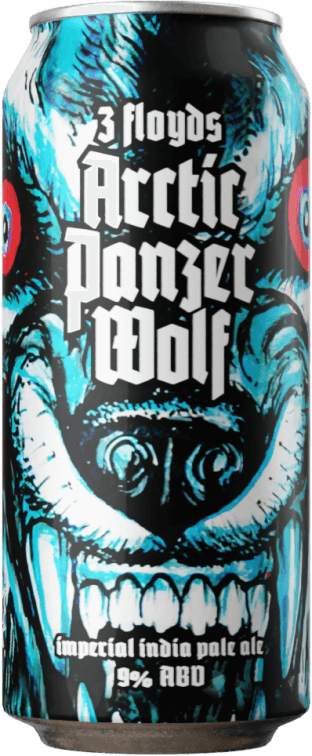
<p><strong><em>"Arctic Panzer Wolf"</em></strong></p>
</div>
<div class="paragraph">
<p>Infinispan 16.2 is here, and it is codenamed <a href="https://untappd.com/b/3-floyds-brewing-arctic-panzer-wolf/5776">"Arctic Panzer Wolf"</a>.
Like the beer, this release packs a punch: it&#8217;s bold, it&#8217;s fierce, and there&#8217;s a lot of it.</p>
</div>
<div class="imageblock text-center">
<div class="content">
<img src="/assets/images/blog/arcticpanzerwolf.png" alt="Arctic Panzer Wolf" width="100" height="300">
</div>
</div>
</div>
</div>
<div class="sect1">
<h2 id="resp-endpoint">RESP endpoint</h2>
<div class="sectionbody">
<div class="paragraph">
<p>This release is a huge step forward for our Redis-compatible RESP endpoint. So many new things that it deserves its
own section!</p>
</div>
<div class="sect2">
<h3 id="probabilistic-data-structures">Probabilistic data structures</h3>
<div class="paragraph">
<p>We&#8217;ve implemented a whole family of probabilistic data structures:</p>
</div>
<div class="ulist">
<ul>
<li>
<p><strong>Bloom Filters</strong> (<code>BF.*</code>): space-efficient probabilistic membership testing. Add items and check whether they <em>might</em> be
in the set — with a configurable false positive rate.</p>
</li>
<li>
<p><strong>Cuckoo Filters</strong> (<code>CF.*</code>): like Bloom Filters, but they also support deletion. Handy when your data is more dynamic.</p>
</li>
<li>
<p><strong>Count-Min Sketch</strong> (<code>CMS.*</code>): estimate the frequency of items in a stream without storing all the data. Perfect for
anomaly detection and traffic analysis.</p>
</li>
<li>
<p><strong>Top-K</strong> (<code>TOPK.*</code>): maintain a list of the <em>K</em> most frequent items in a stream. While CMS can tell you <em>how many times</em>
an item has appeared, Top-K tells you <em>which items</em> appear most often — it tracks the heavy hitters so you don&#8217;t have to
query every item individually.</p>
</li>
<li>
<p><strong>HyperLogLog</strong> (<code>PFCOUNT</code>, <code>PFMERGE</code>): estimate the cardinality of large datasets using very little memory. Count unique
visitors, unique events, unique everything.</p>
</li>
</ul>
</div>
<div class="paragraph">
<p>All of these work in clustered mode too!</p>
</div>
</div>
<div class="sect2">
<h3 id="new-bitop-operations-from-redis-8-2">New BITOP operations from Redis 8.2</h3>
<div class="paragraph">
<p>Keeping up with the latest from Redis, we&#8217;ve added the four new bitwise operations introduced in Redis 8.2:
 These give you finer-grained control over bitwise set operations across keys.</p>
</div>
</div>
<div class="sect2">
<h3 id="geosearch-commands">GEOSEARCH commands</h3>
<div class="paragraph">
<p>The <code>GEOSEARCH</code> family of commands is now fully implemented, letting you perform radius and bounding-box queries on
geospatial data.</p>
</div>
</div>
<div class="sect2">
<h3 id="copy-delex-digest-and-more">COPY, DELEX, DIGEST, and more</h3>
<div class="ulist">
<ul>
<li>
<p><code>COPY</code>: copy a key to another key, optionally replacing the destination.</p>
</li>
<li>
<p><code>DELEX</code>: delete a key only if it exists (returning whether it was actually deleted).</p>
</li>
<li>
<p><code>DIGEST</code>: return a hash digest of a key&#8217;s value.</p>
</li>
<li>
<p><code>SET</code> conditional options: additional flags for conditional set operations.</p>
</li>
<li>
<p><code>PSUBSCRIBE</code> / <code>PUNSUBSCRIBE</code>: pattern-based Pub/Sub subscriptions.</p>
</li>
<li>
<p><code>AGGREGATE COUNT</code> option for <code>ZUNION</code>, <code>ZINTER</code>, <code>ZUNIONSTORE</code>, and <code>ZINTERSTORE</code>.</p>
</li>
<li>
<p><code>BITFIELD</code> / <code>BITOP</code>: implemented all operations.</p>
</li>
</ul>
</div>
</div>
<div class="sect2">
<h3 id="local-resp-caches-in-clustered-mode">Local RESP caches in clustered mode</h3>
<div class="paragraph">
<p>You can now use local RESP caches in a clustered server. Previously, a local RESP cache created on an unclustered server
would prevent the server from starting in clustered mode. No more!</p>
</div>
</div>
</div>
</div>
<div class="sect1">
<h2 id="infinispan-server">Infinispan Server</h2>
<div class="sectionbody">
<div class="sect2">
<h3 id="granular-jvm-options">Granular JVM options</h3>
<div class="paragraph">
<p>The server startup scripts now split <code>JAVA_OPTS</code> into independently overridable categories:</p>
</div>
<div class="ulist">
<ul>
<li>
<p><code>JAVA_OPTS_BASE</code> — essential JVM flags (headless, ExitOnOutOfMemoryError, incubator modules)</p>
</li>
<li>
<p><code>JAVA_OPTS_NETWORK</code> — network settings (IPv4/IPv6 stack preference)</p>
</li>
<li>
<p><code>JAVA_OPTS_MEMORY</code> — heap, metaspace, and RAM percentage configuration</p>
</li>
<li>
<p><code>JAVA_OPTS_DEBUG</code> — JPDA debug settings</p>
</li>
</ul>
</div>
<div class="paragraph">
<p>Want to tweak just the memory settings? Set <code>JAVA_OPTS_MEMORY</code> and leave the rest alone. Setting <code>JAVA_OPTS</code> directly
still overrides everything for backward compatibility.</p>
</div>
</div>
<div class="sect2">
<h3 id="ecs-logging-support">ECS logging support</h3>
<div class="paragraph">
<p>The server now bundles <code>log4j-layout-template-json</code>, enabling native
<a href="https://www.elastic.co/guide/en/ecs/current/index.html">Elastic Common Schema (ECS)</a> formatted logging out of the box.
Just point your Log4j2 config at the built-in ECS template:</p>
</div>
<div class="listingblock">
<div class="content">
<pre class="highlightjs highlight"><code class="language-xml hljs" data-lang="xml">&lt;JsonTemplateLayout eventTemplateUri="classpath:EcsLayout.json"/&gt;</code></pre>
</div>
</div>
<div class="paragraph">
<p>No more custom images or runtime library hacking to get structured JSON logs into your Elasticsearch/Kibana stack.</p>
</div>
</div>
<div class="sect2">
<h3 id="simplified-pem-certificate-configuration">Simplified PEM certificate configuration</h3>
<div class="paragraph">
<p>TLS configuration with PEM certificates has been unified and simplified. The server now auto-detects keystore types,
so you no longer need to juggle different property names for PEM vs PKCS#12 certificates.</p>
</div>
</div>
<div class="sect2">
<h3 id="minimal-boot-logging">Minimal boot logging</h3>
<div class="paragraph">
<p>The server now uses minimal logging until the classpath is fully configured, preventing noisy or misleading log
messages during early startup.</p>
</div>
</div>
<div class="sect2">
<h3 id="configurable-backpressure-for-hot-rod-client-listeners">Configurable backpressure for Hot Rod client listeners</h3>
<div class="paragraph">
<p>The server now supports configurable backpressure for Hot Rod client event listeners. When a client cannot consume
events fast enough, the server buffers them up to a configurable limit instead of dropping events or blocking the
originating cache operation. This gives operators control over the trade-off between memory usage and event delivery
reliability for slow consumers.</p>
</div>
</div>
<div class="sect2">
<h3 id="backup-support-for-multimaps-resp-and-memcached-caches">Backup support for multimaps, RESP, and Memcached caches</h3>
<div class="paragraph">
<p>Server backups now include multimap caches as well as caches created via the RESP and Memcached endpoints. Previously,
these were silently skipped during backup and restore operations.</p>
</div>
</div>
<div class="sect2">
<h3 id="rocksdb-cache-store-removed-from-the-server-distribution">RocksDB cache store removed from the server distribution</h3>
<div class="paragraph">
<p>The RocksDB cache store has been moved out of the server distribution. It is still available as a separate module if
you need it, but the server image is now lighter. The bundled SIFS store is the recommended persistence option.</p>
</div>
</div>
</div>
</div>
<div class="sect1">
<h2 id="cli">CLI</h2>
<div class="sectionbody">
<div class="sect2">
<h3 id="suggestions">Suggestions</h3>
<div class="paragraph">
<p>The CLI now provides suggestions based on your command history and command syntax.</p>
</div>
</div>
<div class="sect2">
<h3 id="connection-bookmarks">Connection bookmarks</h3>
<div class="paragraph">
<p>Tired of typing long connection URLs and credentials every time? The new <code>bookmark</code> command lets you save named
connection bookmarks:</p>
</div>
<div class="listingblock">
<div class="content">
<pre class="highlightjs highlight"><code class="language-shell hljs" data-lang="shell">bookmark set prod -u https://prod-server:11222 --username admin --password secret
connect prod</code></pre>
</div>
</div>
<div class="paragraph">
<p>Passwords are stored encrypted in a PKCS12 credential store. Bookmarks are also used by the new <code>mcp</code> CLI command for
a seamless AI integration experience.</p>
</div>
</div>
</div>
</div>
<div class="sect1">
<h2 id="core">Core</h2>
<div class="sectionbody">
<div class="sect2">
<h3 id="json-configuration-schemas">JSON configuration schemas</h3>
<div class="paragraph">
<p>Infinispan now provides JSON schemas that mirror the existing XSD schemas, making it easier to author and validate
configuration in JSON and YAML formats with full editor support and autocompletion.</p>
</div>
</div>
<div class="sect2">
<h3 id="pull-based-state-transfer">Pull-based state transfer</h3>
<div class="paragraph">
<p>State transfer has been reworked to use a pull-based approach instead of the previous push model. This gives the
receiving node much better control over backpressure and memory consumption during rebalancing. Previously, all existing
owners would push data simultaneously, making memory pressure scale linearly with cluster size. The new approach is
smarter and more efficient.</p>
</div>
</div>
<div class="sect2">
<h3 id="memory-monitor">Memory monitor</h3>
<div class="paragraph">
<p>A new <code>MemoryMonitor</code> component tracks JVM memory and GC health with configurable thresholds:</p>
</div>
<div class="ulist">
<ul>
<li>
<p>Memory threshold alerts when old generation heap usage exceeds a percentage (default 85%)</p>
</li>
<li>
<p>GC duration alerts when a single GC pause is too long (default 5 seconds)</p>
</li>
<li>
<p>GC pressure tracking alerts when too much time is spent in GC over a rolling window</p>
</li>
</ul>
</div>
<div class="paragraph">
<p>All thresholds are tunable at runtime and configurable via a new <code>&lt;memory-monitor&gt;</code> element.</p>
</div>
</div>
<div class="sect2">
<h3 id="dynamic-eviction-based-on-memory-pressure">Dynamic eviction based on memory pressure</h3>
<div class="paragraph">
<p>Eviction can now be driven by actual JVM memory pressure instead of relying solely on static entry counts or fixed
memory sizes. When enabled, Infinispan monitors old generation heap usage and dynamically adjusts eviction thresholds
to keep the JVM healthy. This means caches can make the most of available memory without the guesswork of manually
sizing <code>max-count</code> or <code>max-size</code> — the system responds to real conditions, evicting more aggressively when memory
is tight and relaxing when there is headroom.</p>
</div>
</div>
<div class="sect2">
<h3 id="serialized-cache-entries-on-heap">Serialized cache entries on heap</h3>
<div class="paragraph">
<p>You can now store cache entries in their serialized form even when using heap storage. This is particularly useful for
entries with many fields where the serialized byte representation is more memory-efficient than the full Java object
graph.</p>
</div>
</div>
<div class="sect2">
<h3 id="graceful-shutdown-and-network-partitions">Graceful shutdown and network partitions</h3>
<div class="paragraph">
<p>The graceful shutdown procedure has been hardened to handle network partitions correctly. Previously, star-shaped
partitions (where the coordinator could see all nodes, but nodes couldn&#8217;t see each other) during restart could lead to
data loss. This has been fixed.</p>
</div>
</div>
<div class="sect2">
<h3 id="orderly-cache-scale-down">Orderly cache scale-down</h3>
<div class="paragraph">
<p>Stopping a cache or (concurrently) scaling down a cluster node while state transfer is in progress could previously
result in data loss: the departing node would leave before its data had been fully redistributed to the remaining members.
New overloads on <code>Cache.stop(timeout, TimeUnit)</code>, <code>EmbeddedCacheManager.stop(timeout, TimeUnit)</code>, and
<code>EmbeddedCacheManager.stopCache(cacheName, timeout, TimeUnit)</code> let you specify how long to wait for any in-flight state
transfer to complete before leaving. If the timeout elapses, the method returns <code>false</code> so you can decide what to do next.
The existing no-arg <code>stop()</code> methods continue to work as before.</p>
</div>
</div>
<div class="sect2">
<h3 id="generic-micrometer-meterregistry-support">Generic Micrometer MeterRegistry support</h3>
<div class="paragraph">
<p>Infinispan now supports any Micrometer <code>MeterRegistry</code>, not just Prometheus. This means you can use OTLP, Simple, or any
other Micrometer registry implementation without needing a Prometheus dependency on the classpath.</p>
</div>
</div>
<div class="sect2">
<h3 id="counter-configuration-events">Counter configuration events</h3>
<div class="paragraph">
<p>Counter configuration changes (add/modify/remove) now generate container events and are streamed via the REST SSE
listeners. This enables the Infinispan Operator to implement Counter custom resources.</p>
</div>
</div>
<div class="sect2">
<h3 id="sifs-persistence-store-improvements">SIFS persistence store improvements</h3>
<div class="paragraph">
<p>The Soft-Index File Store (SIFS) has received several reliability and performance improvements:</p>
</div>
<div class="ulist">
<ul>
<li>
<p><strong>Buffered index updates</strong>: index writes are now batched in memory before being flushed to disk, reducing the number of
I/O operations and improving write throughput.</p>
</li>
<li>
<p><strong>B+ tree refactoring</strong>: the internal B+ tree used for the SIFS index has been extracted into a standalone, independently
testable class, resolving a number of hard-to-reproduce corruption issues related to soft reference reclamation and
concurrent access.</p>
</li>
<li>
<p><strong>Segment lifecycle fixes</strong>: fixed a race condition where rapid segment removal and re-addition could corrupt the index,
and ensured that segment removal completes fully before the segment can be reused.</p>
</li>
<li>
<p><strong>Persistence timeout support</strong>: persistence operations now have configurable timeouts, preventing the system from
hanging indefinitely when a store operation stalls or a lock is never released.</p>
</li>
</ul>
</div>
</div>
</div>
</div>
<div class="sect1">
<h2 id="protostream">ProtoStream</h2>
<div class="sectionbody">
<div class="paragraph">
<p>The ProtoStream serialization library has seen major improvements across performance, usability, and JSON support:</p>
</div>
<div class="ulist">
<ul>
<li>
<p><strong>ASCII string optimizations</strong>: writing ASCII strings now takes advantage of the JVM&#8217;s internal <code>String</code> coder and value
fields, and uses <code>VarHandle</code> for fixed-width writes, reducing encoding overhead.</p>
</li>
<li>
<p><strong>Kotlin support</strong>: the annotation processor now supports Kotlin classes and <code>data class</code> types.</p>
</li>
<li>
<p><strong>Copy-on-write serialization context</strong>: the serialization context state is now copy-on-write, improving thread safety
when schemas are registered concurrently as well as improving performance.</p>
</li>
<li>
<p><strong>JPMS support</strong>: ProtoStream is now fully modularized with proper <code>module-info</code> descriptors.</p>
</li>
</ul>
</div>
</div>
</div>
<div class="sect1">
<h2 id="query">Query</h2>
<div class="sectionbody">
<div class="sect2">
<h3 id="antlr-4">ANTLR 4</h3>
<div class="paragraph">
<p>The Ickle query parser has been migrated from the unmaintained ANTLR 3 to ANTLR 4, improving reproducible builds and
eliminating a stale runtime dependency.</p>
</div>
</div>
</div>
</div>
<div class="sect1">
<h2 id="spring-boot">Spring Boot</h2>
<div class="sectionbody">
<div class="sect2">
<h3 id="automatic-schema-registration">Automatic schema registration</h3>
<div class="paragraph">
<p>The Spring Boot integration now automatically registers Protobuf schemas, matching the behavior that was already
available in the Quarkus integration.</p>
</div>
</div>
</div>
</div>
<div class="sect1">
<h2 id="console">Console</h2>
<div class="sectionbody">
<div class="paragraph">
<p>The web console has received a batch of usability improvements:</p>
</div>
<div class="ulist">
<ul>
<li>
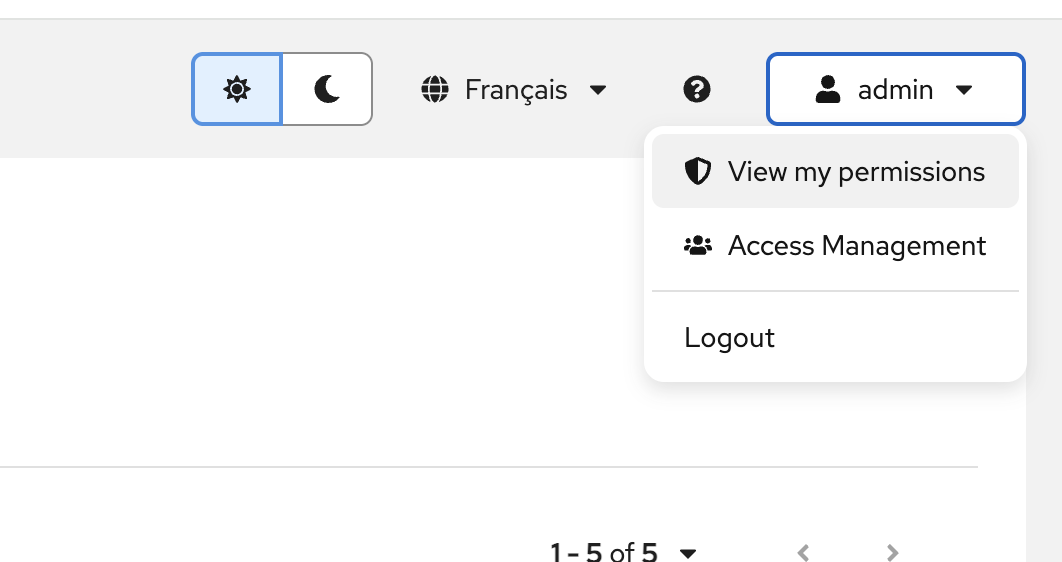
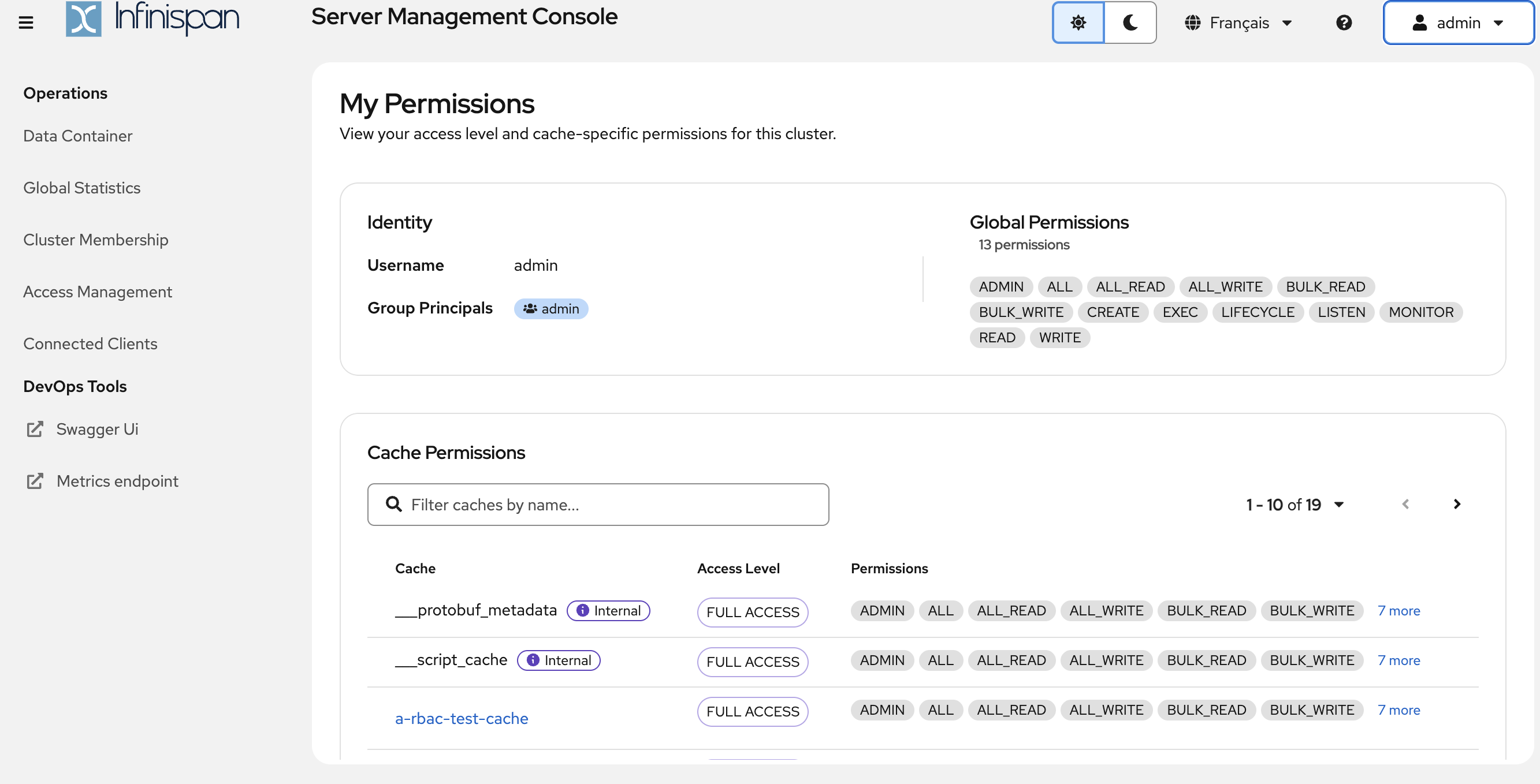
<p><strong>User permissions page</strong>: a new page to display current user permissions, making it easier to understand who can
do what.</p>
</li>
</ul>
</div>
<div class="imageblock text-center">
<div class="content">
<a class="image" href="/assets/images/blog/2026-infinispan-16-2-release/16.2.Console_My_Permissions_Menu.png"><img src="/assets/images/blog/2026-infinispan-16-2-release/16.2.Console_My_Permissions_Menu.png" alt="My Permissions menu" width="300"></a>
</div>
</div>
<div class="imageblock text-center">
<div class="content">
<a class="image" href="/assets/images/blog/2026-infinispan-16-2-release/16.2.Console_My_Permissions.png"><img src="/assets/images/blog/2026-infinispan-16-2-release/16.2.Console_My_Permissions.png" alt="My Permissions page"></a>
</div>
</div>
<div class="ulist">
<ul>
<li>
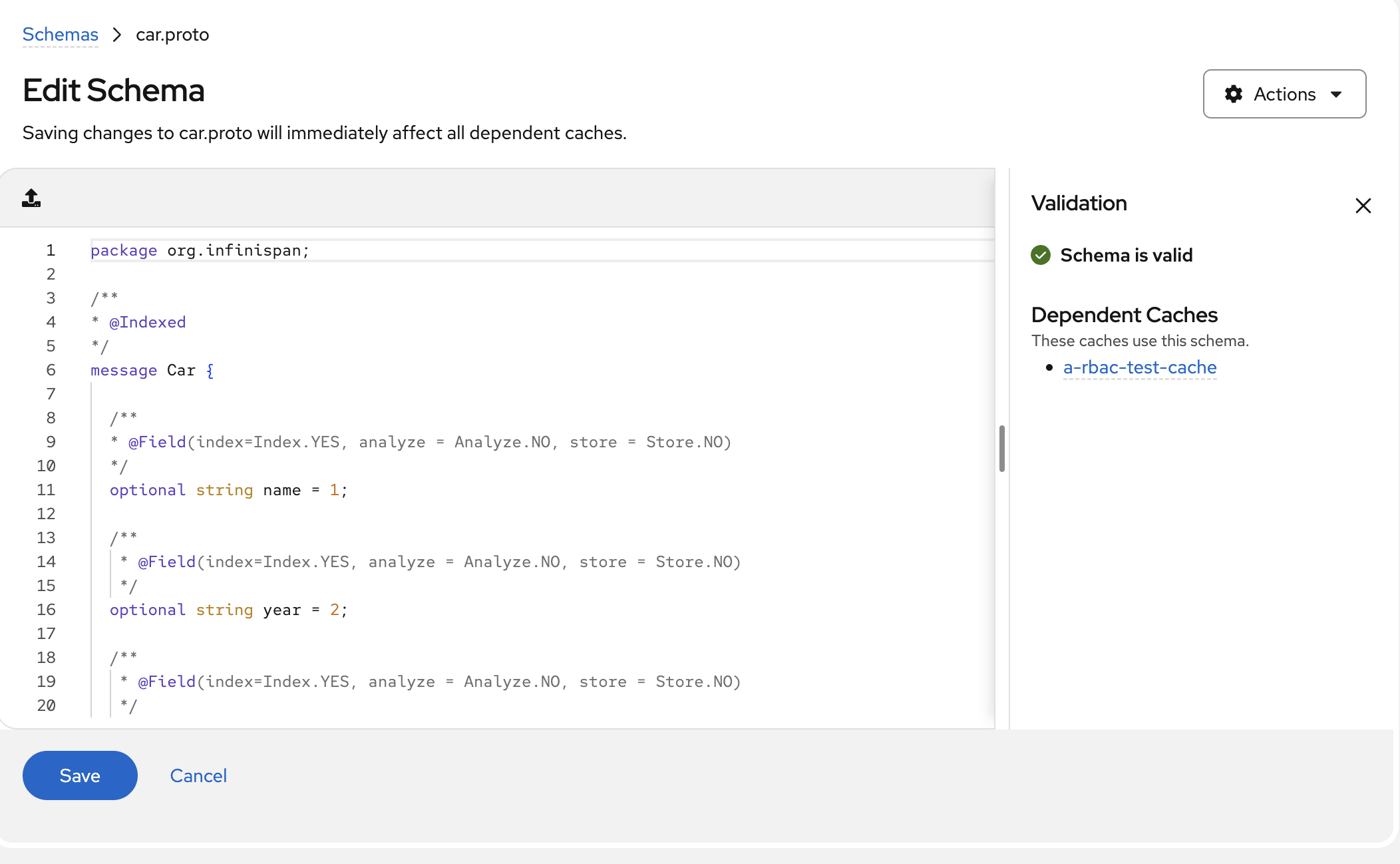
<p><strong>Schema editor with syntax highlighting</strong>: the schema editor now uses the Monaco code editor with Protobuf syntax
highlighting and code assistance.</p>
</li>
</ul>
</div>
<div class="imageblock text-center">
<div class="content">
<a class="image" href="/assets/images/blog/2026-infinispan-16-2-release/16.2.Console_Edit_Schemas.png"><img src="/assets/images/blog/2026-infinispan-16-2-release/16.2.Console_Edit_Schemas.png" alt="Schema editor with syntax highlighting"></a>
</div>
</div>
<div class="ulist">
<ul>
<li>
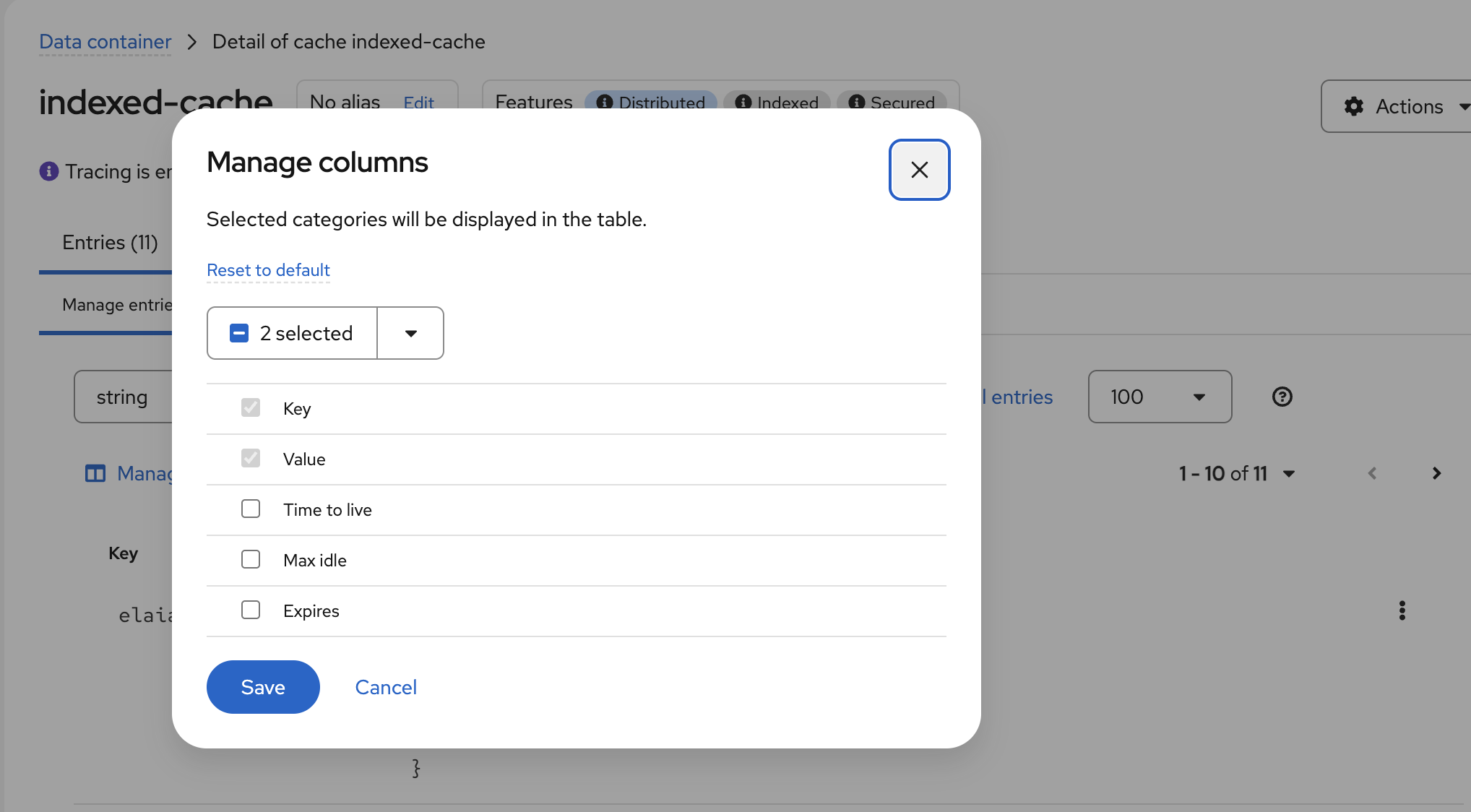
<p><strong>Manage columns in cache detail</strong>: customize which columns are displayed in the cache entries view.</p>
</li>
</ul>
</div>
<div class="imageblock text-center">
<div class="content">
<a class="image" href="/assets/images/blog/2026-infinispan-16-2-release/16.2.Console_Columns.png"><img src="/assets/images/blog/2026-infinispan-16-2-release/16.2.Console_Columns.png" alt="Manage columns dialog"></a>
</div>
</div>
<div class="ulist">
<ul>
<li>
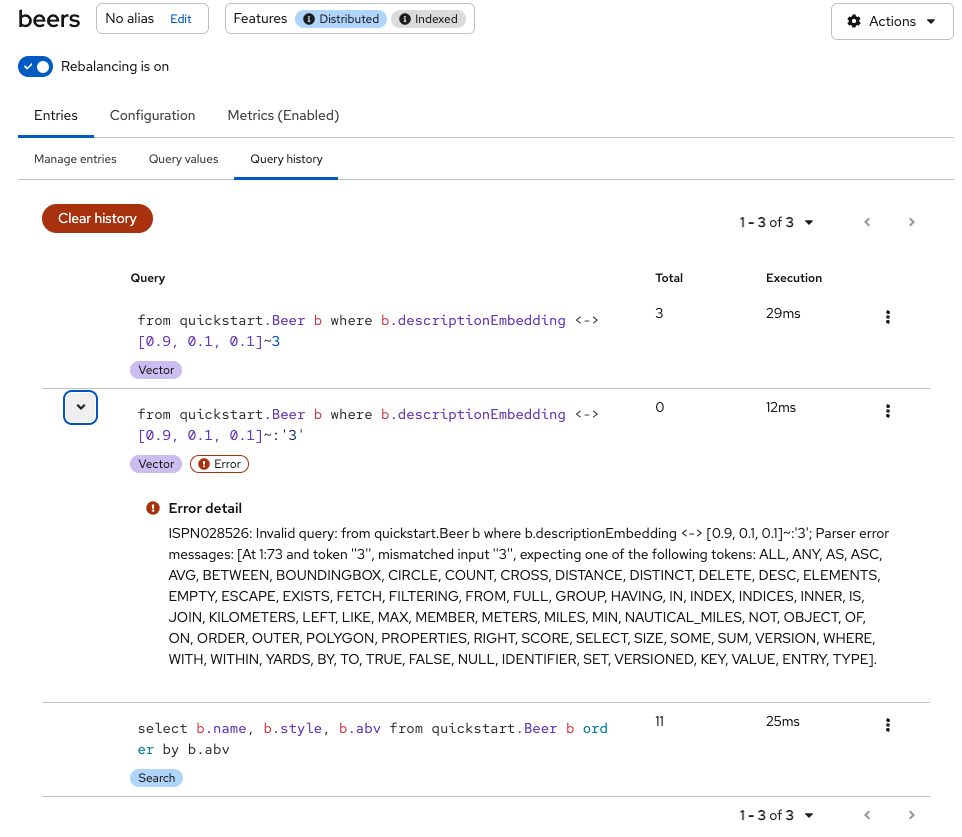
<p><strong>Query history</strong>: your recent queries are now remembered, so you can quickly re-run them.</p>
</li>
</ul>
</div>
<div class="imageblock text-center">
<div class="content">
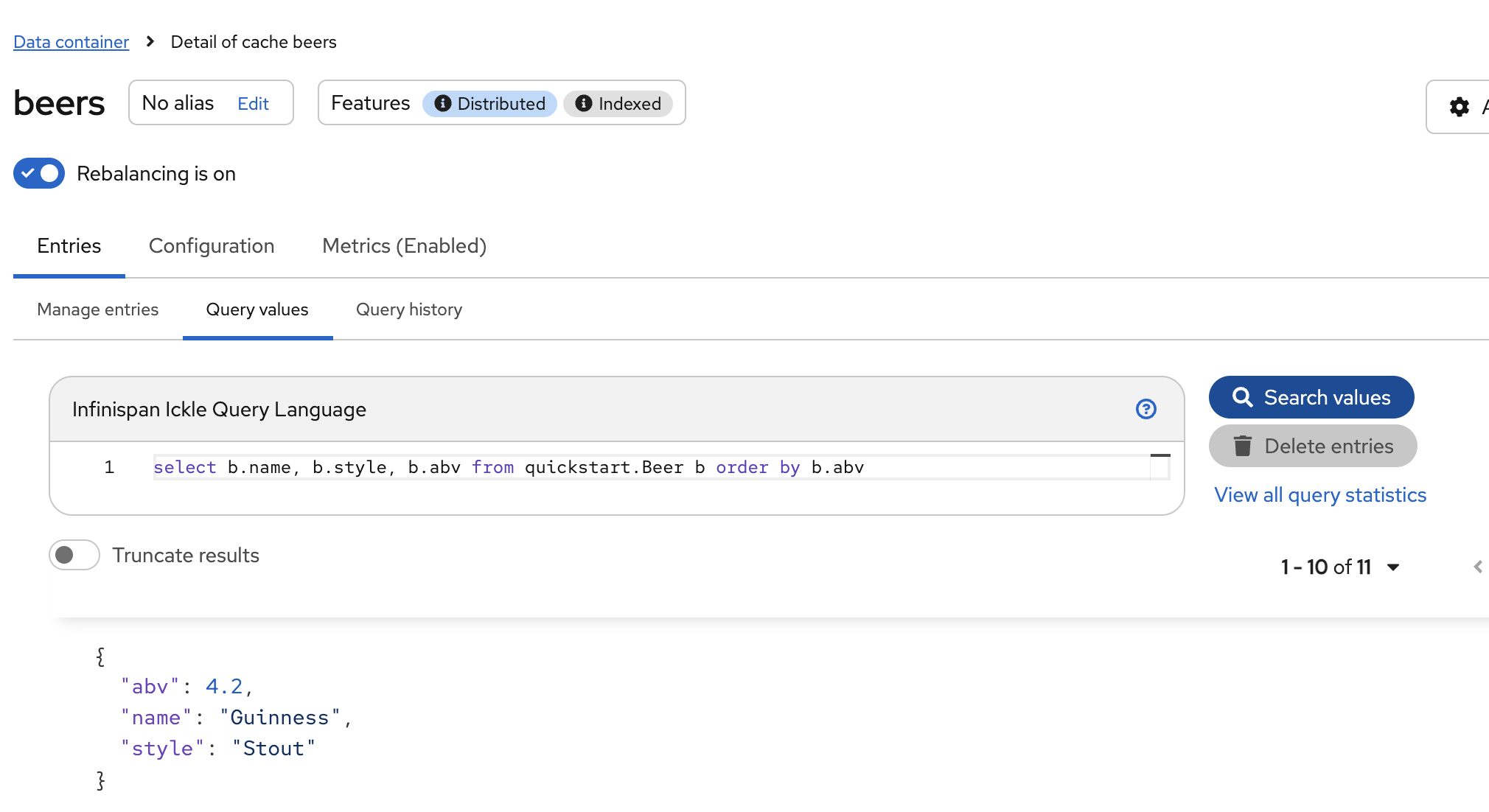
<a class="image" href="/assets/images/blog/2026-infinispan-16-2-release/16.2.Console_Query.png"><img src="/assets/images/blog/2026-infinispan-16-2-release/16.2.Console_Query.png" alt="Query values view"></a>
</div>
</div>
<div class="imageblock text-center">
<div class="content">
<a class="image" href="/assets/images/blog/2026-infinispan-16-2-release/16.2.Console_Query_History.png"><img src="/assets/images/blog/2026-infinispan-16-2-release/16.2.Console_Query_History.png" alt="Query history view"></a>
</div>
</div>
<div class="ulist">
<ul>
<li>
<p><strong>Swagger UI and metrics links</strong>: direct links to the Swagger UI and metrics endpoints from the console.</p>
</li>
<li>
<p><strong>Truncate result values</strong>: a checkbox to truncate long values in query results for better readability.</p>
</li>
<li>
<p><strong>Persistent pagination settings</strong>: pagination preferences are now remembered across sessions.</p>
</li>
<li>
<p><strong>Cache deletion from detail view</strong>: delete a cache directly from its detail page.</p>
</li>
<li>
<p><strong>Internationalization</strong>: updated translations for French, Spanish, Italian, and Brazilian Portuguese.</p>
</li>
</ul>
</div>
</div>
</div>
<div class="sect1">
<h2 id="mcp">MCP</h2>
<div class="sectionbody">
<div class="sect2">
<h3 id="cli-stdio-transport">CLI stdio transport</h3>
<div class="paragraph">
<p>Connecting your AI tools to Infinispan just got a whole lot easier. We&#8217;ve added an <code>mcp</code> command to the CLI that acts as
a stdio transport bridge for the Model Context Protocol.</p>
</div>
<div class="paragraph">
<p>This means you can now use Infinispan as an MCP server from Claude Desktop, Claude Code, VS Code, or any other MCP
client:</p>
</div>
<div class="listingblock">
<div class="content">
<pre class="highlightjs highlight"><code class="language-json hljs" data-lang="json">{
  "mcpServers": {
    "infinispan": {
      "command": "infinispan",
      "args": ["mcp", "--bookmark", "prod-cluster"]
    }
  }
}</code></pre>
</div>
</div>
<div class="paragraph">
<p>The CLI command connects to the server&#8217;s <code>/v3/mcp</code> HTTP endpoint and proxies JSON-RPC messages via stdin/stdout. Use it
with CLI bookmarks (we mentioned those above!) for a seamless, secure connection.</p>
</div>
</div>
<div class="sect2">
<h3 id="gc-log-as-mcp-resource">GC log as MCP resource</h3>
<div class="paragraph">
<p>The server&#8217;s GC log is now exposed as an MCP resource, so your AI tools can inspect garbage collection behavior directly.</p>
</div>
</div>
</div>
</div>
<div class="sect1">
<h2 id="backwards-compatibility">Backwards compatibility</h2>
<div class="sectionbody">
<div class="paragraph">
<p>Infinispan 16.2 is fully backwards compatible with 16.1 deployments.</p>
</div>
</div>
</div>
<div class="sect1">
<h2 id="the-next-release">The next release</h2>
<div class="sectionbody">
<div class="paragraph">
<p>According to our <a href="/roadmap/">roadmap</a>, our next release will be 16.3, and it will happen on 2026-10-07.</p>
</div>
</div>
</div>
<div class="sect1">
<h2 id="release-notes">Release notes</h2>
<div class="sectionbody">
<div class="paragraph">
<p>You can look at the <a href="https://github.com/infinispan/infinispan/releases/tag/16.2.0">release notes</a> to see what was changed
since our previous release.</p>
</div>
<div class="paragraph">
<p>Get them from our <a href="https://infinispan.org/download/">download page</a>.</p>
</div>
</div>
</div>]]></content><author><name>Tristan Tarrant</name></author><category term="release" /><category term="final" /><summary type="html"><![CDATA["Arctic Panzer Wolf"]]></summary></entry><entry><title type="html">Infinispan Hot Rod JS Client 0.14.0: Near Feature Parity with Java</title><link href="https://infinispan.org/blog/2026/05/06/hotrod-js-client-0-14-0" rel="alternate" type="text/html" title="Infinispan Hot Rod JS Client 0.14.0: Near Feature Parity with Java" /><published>2026-05-06T00:00:00+00:00</published><updated>2026-05-06T00:00:00+00:00</updated><id>https://infinispan.org/blog/2026/05/06/hotrod-js-client-014</id><content type="html" xml:base="https://infinispan.org/blog/2026/05/06/hotrod-js-client-0-14-0"><![CDATA[<div id="preamble">
<div class="sectionbody">
<div class="paragraph">
<p>We are happy to announce the release of the <a href="https://github.com/infinispan/js-client/releases/tag/v0.14.0">Infinispan Hot Rod JS Client 0.14.0</a>.
This release brings the JavaScript client very close to feature parity with the Java Hot Rod client, with support for near caching, distributed counters, admin operations, and protocol auto-negotiation.</p>
</div>
</div>
</div>
<div class="sect1">
<h2 id="protocol-auto-negotiation">Protocol auto-negotiation</h2>
<div class="sectionbody">
<div class="paragraph">
<p>The client can now automatically negotiate the highest mutually-supported protocol version with the server.
No more guessing which version to use: just set <code>version: 'auto'</code> and the client will pick the best available.</p>
</div>
<div class="listingblock">
<div class="content">
<pre class="highlightjs highlight"><code class="language-javascript hljs" data-lang="javascript">var infinispan = require('infinispan');

var client = await infinispan.client(
  {port: 11222, host: 'localhost'},
  {
    version: 'auto',
    authentication: {
      enabled: true,
      saslMechanism: 'DIGEST-MD5',
      userName: 'admin',
      password: 'changeit'
    }
  }
);

// Check which version was negotiated
console.log('Protocol:', client.getProtocolVersion());  // e.g. '4.1'</code></pre>
</div>
</div>
</div>
</div>
<div class="sect1">
<h2 id="near-caching">Near caching</h2>
<div class="sectionbody">
<div class="paragraph">
<p>Near caching stores recently accessed entries on the client side, dramatically reducing latency for read-heavy workloads.
The cache uses LRU eviction and is automatically invalidated when entries are modified.</p>
</div>
<div class="listingblock">
<div class="content">
<pre class="highlightjs highlight"><code class="language-javascript hljs" data-lang="javascript">var client = await infinispan.client(
  {port: 11222, host: 'localhost'},
  {
    version: 'auto',
    nearCache: { maxEntries: 16 },
    authentication: { /* ... */ }
  }
);

await client.put('key', 'value');

// First get: fetches from server and populates the near cache
var v1 = await client.get('key');

// Second get: served from the local near cache, no server roundtrip
var v2 = await client.get('key');

// Writes automatically invalidate the near cache
await client.put('key', 'new-value');</code></pre>
</div>
</div>
</div>
</div>
<div class="sect1">
<h2 id="distributed-counters">Distributed counters</h2>
<div class="sectionbody">
<div class="paragraph">
<p>Distributed counters are cluster-wide atomic counters, available in two flavors: <strong>strong</strong> (linearizable, optionally bounded) and <strong>weak</strong> (higher concurrency, eventually consistent).</p>
</div>
<div class="listingblock">
<div class="content">
<pre class="highlightjs highlight"><code class="language-javascript hljs" data-lang="javascript">// Strong unbounded counter
await client.counterCreate('page-views', {
  type: 'strong',
  initialValue: 0
});

// Strong bounded counter
await client.counterCreate('stock', {
  type: 'strong',
  initialValue: 50,
  lowerBound: 0,
  upperBound: 1000,
  storage: 'persistent'
});

// Weak counter for high-throughput scenarios
await client.counterCreate('impressions', {
  type: 'weak',
  initialValue: 0,
  concurrencyLevel: 4
});

// Atomic operations
var current = await client.counterGet('page-views');
var updated = await client.counterAddAndGet('page-views', 1);
var swapped = await client.counterCompareAndSwap('stock', 50, 49);
await client.counterReset('page-views');</code></pre>
</div>
</div>
</div>
</div>
<div class="sect1">
<h2 id="admin-operations">Admin operations</h2>
<div class="sectionbody">
<div class="paragraph">
<p>The <code>client.admin</code> namespace provides cache lifecycle management and Protobuf schema administration, enabling full cluster management directly from JavaScript.</p>
</div>
<div class="listingblock">
<div class="content">
<pre class="highlightjs highlight"><code class="language-javascript hljs" data-lang="javascript">// Create a cache from XML configuration
await client.admin.createCache('sessions',
  '&lt;local-cache&gt;&lt;encoding media-type="text/plain"/&gt;&lt;/local-cache&gt;'
);

// Idempotent create: no error if it already exists
await client.admin.getOrCreateCache('sessions',
  '&lt;local-cache&gt;&lt;encoding media-type="text/plain"/&gt;&lt;/local-cache&gt;'
);

// List all caches
var names = await client.admin.cacheNames();

// Remove a cache
await client.admin.removeCache('sessions');

// Register a Protobuf schema
await client.admin.registerSchema('person.proto', `
  package example;
  message Person {
    required string name = 1;
    optional int32 age = 2;
  }
`);</code></pre>
</div>
</div>
</div>
</div>
<div class="sect1">
<h2 id="protocol-3-1-4-0-and-4-1-support">Protocol 3.1, 4.0, and 4.1 support</h2>
<div class="sectionbody">
<div class="paragraph">
<p>This release adds support for Hot Rod protocol versions 3.1, 4.0, and 4.1, each bringing new capabilities:</p>
</div>
<div class="ulist">
<ul>
<li>
<p><strong>Protocol 3.1</strong>&#8201;&#8212;&#8201;Distributed counter operations</p>
</li>
<li>
<p><strong>Protocol 4.0</strong>&#8201;&#8212;&#8201;Previous value with metadata in mutation responses</p>
</li>
<li>
<p><strong>Protocol 4.1</strong>&#8201;&#8212;&#8201;JSON data format support</p>
</li>
</ul>
</div>
<div class="listingblock">
<div class="content">
<pre class="highlightjs highlight"><code class="language-javascript hljs" data-lang="javascript">// Protocol 4.0+: mutation operations can return previous values
var client = await infinispan.client(
  {port: 11222, host: 'localhost'},
  { version: '4.0', authentication: { /* ... */ } }
);

await client.put('key', 'original');
var prev = await client.put('key', 'updated', { previous: true });
console.log(prev);  // 'original'</code></pre>
</div>
</div>
</div>
</div>
<div class="sect1">
<h2 id="get-started">Get started</h2>
<div class="sectionbody">
<div class="paragraph">
<p>Install the client via npm:</p>
</div>
<div class="listingblock">
<div class="content">
<pre class="highlightjs highlight"><code class="language-bash hljs" data-lang="bash">npm install infinispan</code></pre>
</div>
</div>
<div class="paragraph">
<p>Check out the full <a href="https://github.com/infinispan/js-client">source code and documentation</a> on GitHub.</p>
</div>
</div>
</div>]]></content><author><name>Tristan Tarrant</name></author><category term="hotrod" /><category term="javascript" /><category term="client" /><category term="release" /><summary type="html"><![CDATA[We are happy to announce the release of the Infinispan Hot Rod JS Client 0.14.0. This release brings the JavaScript client very close to feature parity with the Java Hot Rod client, with support for near caching, distributed counters, admin operations, and protocol auto-negotiation.]]></summary></entry><entry><title type="html">Vector search quickstart with Infinispan</title><link href="https://infinispan.org/blog/2026/04/30/vector-search-quickstart" rel="alternate" type="text/html" title="Vector search quickstart with Infinispan" /><published>2026-04-30T00:00:00+00:00</published><updated>2026-04-30T00:00:00+00:00</updated><id>https://infinispan.org/blog/2026/04/30/vector-search-quickstart</id><content type="html" xml:base="https://infinispan.org/blog/2026/04/30/vector-search-quickstart"><![CDATA[<div id="preamble">
<div class="sectionbody">
<div class="paragraph">
<p>Vector databases have become essential building blocks for AI-powered applications.
They let you store unstructured data — text, images, audio — as numerical embeddings that capture semantic meaning, and then find similar items using nearest-neighbour search.</p>
</div>
<div class="paragraph">
<p>Infinispan has supported vector search since version 15, and it does so with a distinctive approach: your data model is defined through <strong>ProtoStream annotations</strong> that generate Protobuf schemas automatically, your queries use the <strong>Ickle query language</strong> that seamlessly combines relational filters, full-text search, and kNN vector predicates, and your schemas can <strong>evolve over time</strong> without breaking existing clients.</p>
</div>
<div class="paragraph">
<p>This quickstart walks through a complete example — from defining a data model to running hybrid vector+metadata queries — using a catalogue of beers as our dataset.
If the beer names look familiar, that&#8217;s because every Infinispan release is named after a beer.</p>
</div>
</div>
</div>
<div class="sect1">
<h2 id="defining-the-data-model">Defining the data model</h2>
<div class="sectionbody">
<div class="paragraph">
<p>In Infinispan, entity classes are plain Java records (or POJOs) annotated with ProtoStream and indexing annotations.
These annotations serve double duty: they define the Protobuf serialization schema <strong>and</strong> the search index mapping in a single place.</p>
</div>
<div class="paragraph">
<p>Here is our <code>Beer</code> entity:</p>
</div>
<div class="listingblock">
<div class="content">
<pre class="highlightjs highlight"><code class="language-java hljs" data-lang="java">@Proto
@Indexed
public record Beer(
   @Keyword(projectable = true, sortable = true)
   String name,

   @Keyword(projectable = true, normalizer = "lowercase")
   String style,

   @Keyword(projectable = true, sortable = true, normalizer = "lowercase")
   String brewery,

   @Keyword(projectable = true, normalizer = "lowercase")
   String country,

   @Basic(projectable = true, sortable = true)
   Double abv,

   @Text
   String description,

   @Vector(dimension = 3, similarity = VectorSimilarity.COSINE)
   float[] descriptionEmbedding
) {
}</code></pre>
</div>
</div>
<div class="paragraph">
<p>A few things to note:</p>
</div>
<div class="ulist">
<ul>
<li>
<p><code>@Proto</code> generates the Protobuf schema from the record fields — no separate <code>.proto</code> file to maintain.</p>
</li>
<li>
<p><code>@Indexed</code> enables search indexing for the entity.</p>
</li>
<li>
<p><code>@Keyword</code> fields are stored as exact tokens — ideal for beer names, styles, and brewery names. The <code>normalizer</code> option allows case-insensitive matching.</p>
</li>
<li>
<p><code>@Text</code> fields are analyzed with a full-text tokenizer, enabling natural language search across tasting notes and descriptions.</p>
</li>
<li>
<p><code>@Vector(dimension = 3, similarity = VectorSimilarity.COSINE)</code> marks the embedding field for kNN search. The <code>dimension</code> must match your vector size — here we use 3 for illustration, but a real embedding model would produce 384 or more dimensions.</p>
</li>
<li>
<p><code>@Basic</code> handles numeric fields like ABV with support for range queries and sorting.</p>
</li>
</ul>
</div>
<div class="sect2">
<h3 id="generating-the-protobuf-schema">Generating the Protobuf schema</h3>
<div class="paragraph">
<p>ProtoStream generates the schema and the marshaller at compile time.
All you need is an interface:</p>
</div>
<div class="listingblock">
<div class="content">
<pre class="highlightjs highlight"><code class="language-java hljs" data-lang="java">@ProtoSchema(includeClasses = Beer.class, schemaPackageName = "quickstart")
public interface BeerSchema extends GeneratedSchema {
   BeerSchema INSTANCE = new BeerSchemaImpl();
}</code></pre>
</div>
</div>
<div class="paragraph">
<p>The generated <code>.proto</code> schema is automatically registered with the server when your client connects.
This schema can evolve — you can add new fields, deprecate old ones — without breaking clients that are still using the previous version. This is a direct benefit of Protobuf&#8217;s forwards and backwards compatibility guarantees.</p>
</div>
<div class="paragraph">
<p>Imagine you later want to add food pairing suggestions or IBU ratings: just add the field to the record, and older clients that don&#8217;t know about it will continue to work.</p>
</div>
</div>
</div>
</div>
<div class="sect1">
<h2 id="connecting-and-storing-data">Connecting and storing data</h2>
<div class="sectionbody">
<div class="listingblock">
<div class="content">
<pre class="highlightjs highlight"><code class="language-java hljs" data-lang="java">ConfigurationBuilder builder = new ConfigurationBuilder();
builder.addServer().host("localhost").port(11222)
   .security().authentication().username("admin").password("secret");

RemoteCacheManager cacheManager = new RemoteCacheManager(builder.build());

RemoteCache&lt;String, Beer&gt; cache = cacheManager.administration()
   .getOrCreateCache("beers", new XMLStringConfiguration(
      "&lt;local-cache&gt;" +
      "  &lt;indexing storage=\"filesystem\"&gt;" +
      "    &lt;indexed-entities&gt;" +
      "      &lt;indexed-entity&gt;quickstart.Beer&lt;/indexed-entity&gt;" +
      "    &lt;/indexed-entities&gt;" +
      "  &lt;/indexing&gt;" +
      "&lt;/local-cache&gt;"));</code></pre>
</div>
</div>
<div class="paragraph">
<p>Now let&#8217;s populate the cache with some beers — all named after Infinispan releases.</p>
</div>
<div class="paragraph">
<p>In a production application you would generate embeddings from a model such as <code>all-MiniLM-L6-v2</code> (384 dimensions).
For this quickstart we use hand-crafted 3-dimensional vectors where each axis captures a flavour profile: <strong>dark/roasty</strong>, <strong>light/crisp</strong>, and <strong>hoppy/craft</strong>.
Beers of similar style naturally cluster together in this space — stouts near <code>[1, 0, 0]</code>, lagers near <code>[0, 1, 0]</code>, IPAs near <code>[0, 0, 1]</code> — so kNN queries return intuitive results.</p>
</div>
<div class="listingblock">
<div class="content">
<pre class="highlightjs highlight"><code class="language-java hljs" data-lang="java">cache.put("beer:1", new Beer(
   "Guinness", "Stout", "Guinness Brewery", "Ireland", 4.2,
   "A rich, creamy stout with deep roasted barley flavours, hints of coffee and chocolate, and a velvety smooth finish.",
   new float[]{0.95f, 0.05f, 0.10f}
));

cache.put("beer:2", new Beer(
   "Delirium", "Belgian Strong Ale", "Brouwerij Huyghe", "Belgium", 8.5,
   "A complex strong blonde ale with fruity esters, spicy phenols, and a warming alcohol presence balanced by a dry finish.",
   new float[]{0.30f, 0.30f, 0.70f}
));

cache.put("beer:3", new Beer(
   "Estrella Galicia", "Lager", "Hijos de Rivera", "Spain", 5.5,
   "A crisp European lager with a balanced malt backbone, mild hop bitterness, and a clean refreshing finish.",
   new float[]{0.10f, 0.90f, 0.15f}
));

cache.put("beer:4", new Beer(
   "Mahou", "Pilsner", "Mahou San Miguel", "Spain", 5.5,
   "A golden pilsner with delicate floral hop aromas, light biscuity malt, and a bright effervescent character.",
   new float[]{0.05f, 0.85f, 0.25f}
));

cache.put("beer:5", new Beer(
   "Corona Extra", "Pale Lager", "Grupo Modelo", "Mexico", 4.5,
   "A light, easy-drinking pale lager with subtle sweetness, a hint of citrus, and a crisp dry finish best enjoyed ice-cold.",
   new float[]{0.05f, 0.95f, 0.10f}
));

cache.put("beer:6", new Beer(
   "Tactical Nuclear Penguin", "Imperial Stout", "BrewDog", "Scotland", 32.0,
   "An extreme imperial stout aged in whisky casks, intensely smoky with dark chocolate, coffee, and dried fruit notes.",
   new float[]{0.98f, 0.02f, 0.20f}
));

cache.put("beer:7", new Beer(
   "Brahma", "Lager", "Ambev", "Brazil", 4.3,
   "A light Brazilian lager, smooth and mildly sweet, brewed for easy drinking in warm weather.",
   new float[]{0.05f, 0.92f, 0.05f}
));

cache.put("beer:8", new Beer(
   "Radegast", "Czech Lager", "Radegast Brewery", "Czech Republic", 5.0,
   "A traditional Czech lager with a prominent Saaz hop aroma, bready malt character, and a crisp bitter finish.",
   new float[]{0.15f, 0.80f, 0.30f}
));

cache.put("beer:9", new Beer(
   "Turia", "Märzen", "Turia Brewery", "Spain", 5.4,
   "A toasted amber märzen from Valencia with caramel malt sweetness, a nutty aroma, and a smooth medium body.",
   new float[]{0.60f, 0.40f, 0.15f}
));

cache.put("beer:10", new Beer(
   "Hoptimus Prime", "IPA", "Hoptimus Brewing", "USA", 7.5,
   "An aggressively hopped American IPA bursting with tropical fruit, pine resin, and grapefruit citrus over a sturdy malt backbone.",
   new float[]{0.10f, 0.15f, 0.95f}
));

cache.put("beer:11", new Beer(
   "Pagoa", "Basque Ale", "Pagoa Brewery", "Spain", 5.0,
   "A craft ale from the Basque Country with earthy hops, a light fruity character, and a balanced malty sweetness.",
   new float[]{0.25f, 0.35f, 0.60f}
));</code></pre>
</div>
</div>
</div>
</div>
<div class="sect1">
<h2 id="querying-with-ickle">Querying with Ickle</h2>
<div class="sectionbody">
<div class="paragraph">
<p>Before we get to vector search, let&#8217;s look at what Ickle can do with traditional queries.
This is where Infinispan stands out: you don&#8217;t need to learn a separate query syntax for metadata filters and vector search — Ickle handles both.</p>
</div>
<div class="sect2">
<h3 id="full-text-search">Full-text search</h3>
<div class="paragraph">
<p>Find beers whose description mentions "chocolate":</p>
</div>
<div class="listingblock">
<div class="content">
<pre class="highlightjs highlight"><code class="language-java hljs" data-lang="java">Query&lt;Beer&gt; query = cache.query(
   "from quickstart.Beer b where b.description : 'chocolate'");
List&lt;Beer&gt; results = query.list();
// Returns: Guinness, Tactical Nuclear Penguin</code></pre>
</div>
</div>
</div>
<div class="sect2">
<h3 id="keyword-and-range-filters">Keyword and range filters</h3>
<div class="paragraph">
<p>Find session beers (under 5% ABV) from Spain:</p>
</div>
<div class="listingblock">
<div class="content">
<pre class="highlightjs highlight"><code class="language-java hljs" data-lang="java">Query&lt;Beer&gt; query = cache.query(
   "from quickstart.Beer b where b.country = 'Spain' and b.abv &lt; 5.0");
List&lt;Beer&gt; results = query.list();</code></pre>
</div>
</div>
</div>
<div class="sect2">
<h3 id="projections-and-sorting">Projections and sorting</h3>
<div class="paragraph">
<p>Select specific fields and sort by ABV — a good way to build a menu card:</p>
</div>
<div class="listingblock">
<div class="content">
<pre class="highlightjs highlight"><code class="language-java hljs" data-lang="java">Query&lt;Object[]&gt; query = cache.query(
   "select b.name, b.style, b.brewery, b.abv from quickstart.Beer b " +
   "where b.country = 'Spain' order by b.abv");
List&lt;Object[]&gt; results = query.list();
// Turia (5.4), Estrella Galicia (5.5), Mahou (5.5), Pagoa (5.0)</code></pre>
</div>
</div>
</div>
</div>
</div>
<div class="sect1">
<h2 id="vector-search-knn">Vector search (kNN)</h2>
<div class="sectionbody">
<div class="paragraph">
<p>Now for the main event.
Vector search in Ickle uses the <code>&lt;-&gt;</code> operator to express a kNN predicate: find the <em>k</em> nearest neighbours of a given vector.</p>
</div>
<div class="sect2">
<h3 id="basic-knn-query">Basic kNN query</h3>
<div class="paragraph">
<p>Find the 3 beers closest to the "dark roasty" end of our flavour space:</p>
</div>
<div class="listingblock">
<div class="content">
<pre class="highlightjs highlight"><code class="language-java hljs" data-lang="java">Query&lt;Beer&gt; query = cache.query(
   "from quickstart.Beer b where b.descriptionEmbedding &lt;-&gt; [:v]~:k");
query.setParameter("v", new float[]{0.9f, 0.1f, 0.1f});
query.setParameter("k", 3);

List&lt;Beer&gt; results = query.list();
// Returns: Guinness, Tactical Nuclear Penguin, Turia</code></pre>
</div>
</div>
<div class="paragraph">
<p>Both the vector and <em>k</em> are parameterised — you don&#8217;t need to interpolate values into the query string.</p>
</div>
</div>
<div class="sect2">
<h3 id="score-projection">Score projection</h3>
<div class="paragraph">
<p>To see how close each result is to the query vector, project the score:</p>
</div>
<div class="listingblock">
<div class="content">
<pre class="highlightjs highlight"><code class="language-java hljs" data-lang="java">Query&lt;Object[]&gt; query = cache.query(
   "select b.name, b.style, score(b) from quickstart.Beer b " +
   "where b.descriptionEmbedding &lt;-&gt; [:v]~:k");
query.setParameter("v", new float[]{0.05f, 0.9f, 0.1f});
query.setParameter("k", 3);

List&lt;Object[]&gt; results = query.list();
for (Object[] row : results) {
   System.out.printf("%-30s %-20s score=%.4f%n", row[0], row[1], row[2]);
}
// Corona Extra  score=1.0000
// Brahma        score=0.9992
// Estrella      score=0.9985</code></pre>
</div>
</div>
</div>
</div>
</div>
<div class="sect1">
<h2 id="hybrid-queries-vector-metadata">Hybrid queries: vector + metadata</h2>
<div class="sectionbody">
<div class="paragraph">
<p>This is where Ickle really shines.
You can combine kNN search with any classic predicate — keyword matches, range filters, full-text search — using a <code>filtering</code> clause.</p>
</div>
<div class="sect2">
<h3 id="something-like-a-lager-but-not-too-strong">"Something like a lager, but not too strong"</h3>
<div class="paragraph">
<p>Find the 3 beers closest to the "light crisp" vector, but only lagers under 5% ABV:</p>
</div>
<div class="listingblock">
<div class="content">
<pre class="highlightjs highlight"><code class="language-java hljs" data-lang="java">Query&lt;Object[]&gt; query = cache.query(
   "select score(b), b.name, b.style, b.abv from quickstart.Beer b " +
   "where b.descriptionEmbedding &lt;-&gt; [:v]~:k " +
   "filtering (b.style = 'Lager' and b.abv &lt; 5.0)");
query.setParameter("v", new float[]{0.05f, 0.95f, 0.05f});
query.setParameter("k", 3);

List&lt;Object[]&gt; results = query.list();
// Returns: Brahma (4.3%)</code></pre>
</div>
</div>
</div>
<div class="sect2">
<h3 id="vector-search-filtered-by-country">Vector search filtered by country</h3>
<div class="paragraph">
<p>Find beers from Spain closest to a "toasted malty" profile:</p>
</div>
<div class="listingblock">
<div class="content">
<pre class="highlightjs highlight"><code class="language-java hljs" data-lang="java">Query&lt;Object[]&gt; query = cache.query(
   "select score(b), b.name, b.style, b.abv from quickstart.Beer b " +
   "where b.descriptionEmbedding &lt;-&gt; [:v]~:k filtering b.country = 'Spain'");
query.setParameter("v", new float[]{0.7f, 0.3f, 0.1f});
query.setParameter("k", 3);

List&lt;Object[]&gt; results = query.list();
// Returns: Turia (0.99), Pagoa (0.80), Estrella Galicia (0.75)</code></pre>
</div>
</div>
</div>
<div class="sect2">
<h3 id="combining-full-text-and-vector-search">Combining full-text and vector search</h3>
<div class="paragraph">
<p>Find beers whose descriptions mention "citrus" and are closest to the "hoppy craft" vector:</p>
</div>
<div class="listingblock">
<div class="content">
<pre class="highlightjs highlight"><code class="language-java hljs" data-lang="java">Query&lt;Object[]&gt; query = cache.query(
   "select score(b), b.name, b.brewery, b.abv from quickstart.Beer b " +
   "where b.descriptionEmbedding &lt;-&gt; [:v]~:k " +
   "filtering b.description : 'citrus'");
query.setParameter("v", new float[]{0.1f, 0.1f, 0.95f});
query.setParameter("k", 5);

List&lt;Object[]&gt; results = query.list();
// Returns: Hoptimus Prime (0.9993), Corona Extra (0.6061)</code></pre>
</div>
</div>
<div class="paragraph">
<p>The filtering clause accepts any valid Ickle predicate — including boolean combinations with <code>and</code> / <code>or</code> — so you can build arbitrarily complex filters. The filter is applied <strong>before</strong> the kNN search, narrowing the candidate set.</p>
</div>
</div>
</div>
</div>
<div class="sect1">
<h2 id="why-infinispan-for-vector-search">Why Infinispan for vector search?</h2>
<div class="sectionbody">
<div class="paragraph">
<p>If you&#8217;re evaluating vector databases, here is what sets Infinispan apart:</p>
</div>
<div class="paragraph">
<p><strong>Unified query language.</strong>
Ickle gives you relational queries, full-text search, and vector kNN search in a single language.
No need for a separate "search module" with its own syntax — the same <code>cache.query(&#8230;&#8203;)</code> call handles everything.</p>
</div>
<div class="paragraph">
<p><strong>Type-safe data modelling.</strong>
ProtoStream annotations let you define your schema, serialization, and index mappings in one place.
The Protobuf schema is generated at compile time, so schema mismatches are caught before they reach production.</p>
</div>
<div class="paragraph">
<p><strong>Schema evolution.</strong>
Protobuf&#8217;s compatibility guarantees mean you can add new fields (like a vector embedding column) to an existing entity without breaking older clients.
Roll out vector search incrementally — existing applications keep working while new ones start populating and querying the embedding field.</p>
</div>
<div class="paragraph">
<p><strong>Distributed by design.</strong>
kNN queries work across a distributed cluster.
Infinispan scatters data across nodes and fans out vector searches in parallel, merging results transparently.</p>
</div>
<div class="paragraph">
<p><strong>Multiple access protocols.</strong>
The same indexed cache is accessible via Hot Rod (Java, C#, JS, Python), REST, and the RESP (Redis-compatible) protocol.
Your vector search investment is not locked into a single client ecosystem.</p>
</div>
</div>
</div>
<div class="sect1">
<h2 id="tuning-vector-indexing">Tuning vector indexing</h2>
<div class="sectionbody">
<div class="paragraph">
<p>The <code>@Vector</code> annotation exposes HNSW graph parameters that let you trade indexing speed for search accuracy.
These become important with real embedding models where the dimension is much larger (e.g. 384 or 768):</p>
</div>
<div class="listingblock">
<div class="content">
<pre class="highlightjs highlight"><code class="language-java hljs" data-lang="java">@Vector(
   dimension = 384,                         // match your embedding model
   similarity = VectorSimilarity.COSINE,
   beamWidth = 512,                         // graph construction quality (default: 512)
   maxConnections = 16                      // neighbours per node (default: 16, range: 2-100)
)
float[] descriptionEmbedding;</code></pre>
</div>
</div>
<div class="ulist">
<ul>
<li>
<p><strong><code>beamWidth</code></strong> (efConstruction): higher values build a more accurate graph at the cost of slower indexing.</p>
</li>
<li>
<p><strong><code>maxConnections</code></strong> (m): controls memory consumption and search precision. Stay in the 2–100 range.</p>
</li>
<li>
<p><strong><code>similarity</code></strong>: choose from <code>L2</code> (default, euclidean), <code>COSINE</code>, <code>INNER_PRODUCT</code>, or <code>MAX_INNER_PRODUCT</code> depending on your embedding model&#8217;s recommendations.</p>
</li>
</ul>
</div>
</div>
</div>
<div class="sect1">
<h2 id="run-it-yourself">Run it yourself</h2>
<div class="sectionbody">
<div class="paragraph">
<p>A complete runnable version of this quickstart is available in the <a href="https://github.com/infinispan/infinispan-simple-tutorials/tree/main/infinispan-remote/vector-search">infinispan-simple-tutorials</a> repository.
It uses Testcontainers to start an Infinispan server automatically — all you need is Docker and Maven:</p>
</div>
<div class="listingblock">
<div class="content">
<pre class="highlightjs highlight"><code class="language-bash hljs" data-lang="bash">git clone https://github.com/infinispan/infinispan-simple-tutorials.git
cd infinispan-simple-tutorials
mvn -pl infinispan-remote/vector-search compile exec:exec</code></pre>
</div>
</div>
<div class="paragraph">
<p>The tutorial uses the same 3-dimensional hand-crafted vectors shown in this post. To move to a real embedding model, change the <code>dimension</code> in <code>@Vector</code> and replace the <code>float[]</code> literals with vectors from your model — the query patterns stay identical.</p>
</div>
</div>
</div>
<div class="sect1">
<h2 id="next-steps">Next steps</h2>
<div class="sectionbody">
<div class="ulist">
<ul>
<li>
<p>Read the full <a href="https://infinispan.org/docs/stable/titles/query/query.html">Query guide</a> for Ickle syntax details.</p>
</li>
<li>
<p>Explore <a href="https://infinispan.org/docs/stable/titles/encoding/encoding.html">ProtoStream encoding</a> to learn about schema evolution and custom marshallers.</p>
</li>
<li>
<p>Check out the <a href="https://infinispan.org/tutorials/">tutorials</a> for more runnable examples.</p>
</li>
<li>
<p>Join the conversation on <a href="https://infinispan.zulipchat.com/">Zulip</a> or <a href="https://github.com/infinispan/infinispan-simple-tutorials/discussions">GitHub Discussions</a>.</p>
</li>
</ul>
</div>
</div>
</div>]]></content><author><name>Tristan Tarrant</name></author><category term="vector" /><category term="knn" /><category term="embeddings" /><category term="tutorial" /><summary type="html"><![CDATA[Vector databases have become essential building blocks for AI-powered applications. They let you store unstructured data — text, images, audio — as numerical embeddings that capture semantic meaning, and then find similar items using nearest-neighbour search.]]></summary></entry><entry><title type="html">Infinispan Joins the OGX Ecosystem as a Vector IO Provider</title><link href="https://infinispan.org/blog/2026/04/17/infinispan-joins-ogx-ecosystem" rel="alternate" type="text/html" title="Infinispan Joins the OGX Ecosystem as a Vector IO Provider" /><published>2026-04-17T10:00:00+00:00</published><updated>2026-04-17T10:00:00+00:00</updated><id>https://infinispan.org/blog/2026/04/17/infinispan-joins-ogx-ecosystem</id><content type="html" xml:base="https://infinispan.org/blog/2026/04/17/infinispan-joins-ogx-ecosystem"><![CDATA[<div id="preamble">
<div class="sectionbody">
<div class="paragraph">
<p>Infinispan has been integrated into the <a href="https://ogx-ai.github.io/">OGX (Open GenAI Stack)</a>, formerly known as Llama Stack, as a vector IO provider, enabling developers to build RAG (Retrieval-Augmented Generation) applications with distributed vector search.</p>
</div>
</div>
</div>
<div class="sect1">
<h2 id="what-is-ogx">What is OGX?</h2>
<div class="sectionbody">
<div class="paragraph">
<p><a href="https://ogx-ai.github.io/">OGX (Open GenAI Stack)</a> is an open-source agentic API server that composes inference providers, vector stores, safety backends, tool runtimes, and file storage into a single deployable server for building complete AI applications. It serves as a drop-in replacement for the OpenAI API and can run anywhere with any model and infrastructure.</p>
</div>
</div>
</div>
<div class="sect1">
<h2 id="infinispans-vector-capabilities">Infinispan&#8217;s Vector Capabilities</h2>
<div class="sectionbody">
<div class="paragraph">
<p>The integration brings Infinispan&#8217;s distributed caching architecture to RAG applications with three powerful search modes:</p>
</div>
<div class="ulist">
<ul>
<li>
<p><strong>Vector Search</strong>: Embedding-based similarity search using cosine similarity</p>
</li>
<li>
<p><strong>Keyword Search</strong>: Full-text search via Infinispan Query DSL or Ickle</p>
</li>
<li>
<p><strong>Hybrid Search</strong>: Combined vector and keyword search with configurable reranking (RRF or weighted)</p>
</li>
</ul>
</div>
<div class="paragraph">
<p>Additional features include HTTPS/TLS support, Basic and Digest authentication, and seamless REST API integration.</p>
</div>
</div>
</div>
<div class="sect1">
<h2 id="try-the-demo">Try the Demo</h2>
<div class="sectionbody">
<div class="paragraph">
<p>Check out our demo project at <a href="https://github.com/rigazilla/infinispan-llama-stack-rag-demo" class="bare">https://github.com/rigazilla/infinispan-llama-stack-rag-demo</a> that shows how to configure Infinispan as the vector IO backend for OGX RAG workflows, with examples demonstrating document upload, vector embedding storage, and semantic search. As a bonus, you&#8217;ll also learn about the fascinating pataphysical science of Chelonofelodynamics!</p>
</div>
</div>
</div>
<div class="sect1">
<h2 id="learn-more">Learn More</h2>
<div class="sectionbody">
<div class="ulist">
<ul>
<li>
<p><a href="https://ogx-ai.github.io/docs/providers/vector_io/remote_infinispan">OGX Infinispan Provider Documentation</a></p>
</li>
<li>
<p><a href="https://ogx-ai.github.io/docs/providers">OGX Providers Overview</a></p>
</li>
<li>
<p><a href="https://infinispan.org/docs/stable/titles/query/query.html#vector-search_searching-and-querying">Infinispan Vector Search Documentation</a></p>
</li>
</ul>
</div>
<div class="paragraph">
<p>Try it out and let us know what you build!</p>
</div>
</div>
</div>]]></content><author><name>Vittorio Rigamonti</name></author><category term="vector-search" /><category term="ogx" /><category term="llama-stack" /><category term="rag" /><summary type="html"><![CDATA[Infinispan has been integrated into the OGX (Open GenAI Stack), formerly known as Llama Stack, as a vector IO provider, enabling developers to build RAG (Retrieval-Augmented Generation) applications with distributed vector search.]]></summary></entry><entry><title type="html">Exploring the New OpenAPI-Compliant REST API v3 in Infinispan 16.1</title><link href="https://infinispan.org/blog/2026/04/02/exploring-new-openapi-compliant-rest-api-v3-infinispan-161" rel="alternate" type="text/html" title="Exploring the New OpenAPI-Compliant REST API v3 in Infinispan 16.1" /><published>2026-04-02T18:00:00+00:00</published><updated>2026-04-02T18:00:00+00:00</updated><id>https://infinispan.org/blog/2026/04/02/exploring-new-openapi-compliant-rest-api-v3-infinispan-161</id><content type="html" xml:base="https://infinispan.org/blog/2026/04/02/exploring-new-openapi-compliant-rest-api-v3-infinispan-161"><![CDATA[<hr>
<h1 id="exploring-the-new-openapi-compliant-rest-api-v3-in-infinispan-16-1" class="sect0">Exploring the New OpenAPI-Compliant REST API v3 in Infinispan 16.1</h1>
<div class="paragraph">
<p>With Infinispan 16.1 "Polly Want a Pilsner", we introduce the OpenAPI-compliant v3 REST API, bringing modern API standards to Infinispan.</p>
</div>
<div class="sect1">
<h2 id="the-evolution">The Evolution</h2>
<div class="sectionbody">
<div class="paragraph">
<p>Infinispan now embraces OpenAPI standards with the new v3 REST API, enabling better tooling, documentation, and developer experience through standardized API descriptions.</p>
</div>
</div>
</div>
<div class="sect1">
<h2 id="whats-new-in-v3">What&#8217;s New in v3?</h2>
<div class="sectionbody">
<div class="ulist">
<ul>
<li>
<p>Full OpenAPI 3.0 compliance</p>
</li>
<li>
<p>Interactive Swagger UI at <code>/swagger-ui</code></p>
</li>
<li>
<p>Improved endpoint organization and type safety</p>
</li>
</ul>
</div>
</div>
</div>
<div class="sect1">
<h2 id="getting-started">Getting Started</h2>
<div class="sectionbody">
<div class="paragraph">
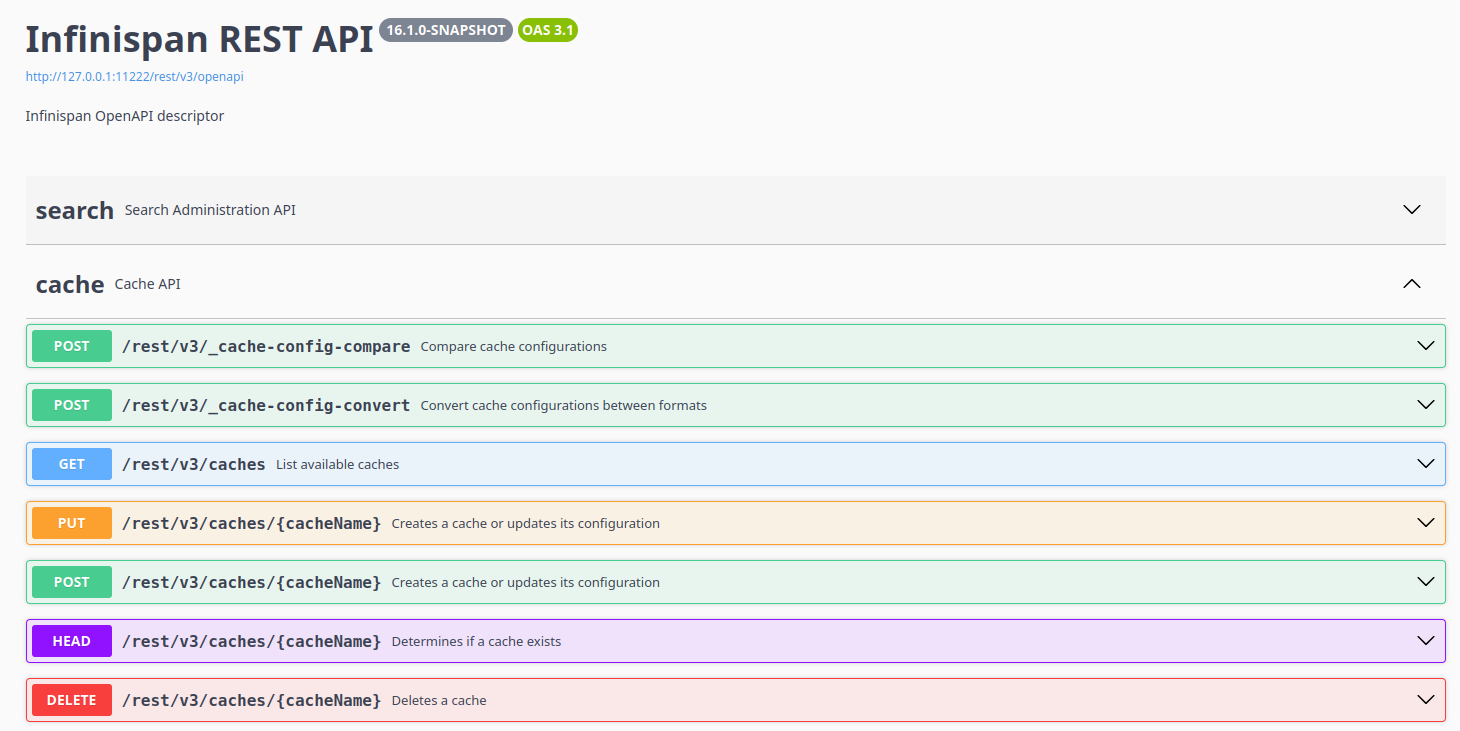
<p>Start an Infinispan Server 16.1+ and visit <code><a href="http://127.0.0.1:11222/swagger-ui/" class="bare">http://127.0.0.1:11222/swagger-ui/</a></code> to explore and test the API. The OpenAPI schema is available at <code><a href="http://127.0.0.1:11222/rest/v3/openapi" class="bare">http://127.0.0.1:11222/rest/v3/openapi</a></code>.</p>
</div>
<div class="imageblock">
<div class="content">
<img src="https://infinispan.org/assets/images/blog/swaggerui.png" alt="Infinispan v3 REST API Swagger UI">
</div>
</div>
</div>
</div>
<div class="sect1">
<h2 id="openapi-benefits">OpenAPI Benefits</h2>
<div class="sectionbody">
<div class="paragraph">
<p>A standardized, rich API description like OpenAPI brings numerous advantages for developers:</p>
</div>
<div class="ulist">
<ul>
<li>
<p><strong>Enhanced Documentation</strong>: Interactive, always-up-to-date API docs via Swagger UI</p>
</li>
<li>
<p><strong>Automated Tooling</strong>: Generate client libraries in multiple languages automatically</p>
</li>
<li>
<p><strong>Improved Testing</strong>: Built-in API testing interfaces</p>
</li>
<li>
<p><strong>Polyglot Support</strong>: OpenAPI works across programming languages, enabling seamless integration regardless of your tech stack</p>
</li>
<li>
<p><strong>AI-Assisted Development</strong>: AI code assistants can generate accurate client code from the OpenAPI spec, reducing development time and errors</p>
</li>
</ul>
</div>
<div class="paragraph">
<p>Check out our demo at <a href="https://github.com/rigazilla/infinispan-sqlstore-demo/tree/openapi-demo" class="bare">https://github.com/rigazilla/infinispan-sqlstore-demo/tree/openapi-demo</a>, which demonstrates a live coding session where AI code assistants generate accurate Infinispan client code from the OpenAPI spec, showcasing rapid development and error reduction.</p>
</div>
</div>
</div>
<div class="sect1">
<h2 id="conclusion">Conclusion</h2>
<div class="sectionbody">
<div class="paragraph">
<p>The v3 API brings modern API standards to Infinispan, enhancing developer productivity. Download 16.1, try the new OpenAPI v3 REST interface, and let us know your feedback!</p>
</div>
<div class="paragraph">
<p>For details, see <a href="https://infinispan.org/docs/stable/titles/rest/rest.html">REST API docs</a>.</p>
</div>
</div>
</div>]]></content><author><name>Vittorio Rigamonti</name></author><category term="infinispan" /><category term="rest" /><category term="openapi" /><category term="16.1" /><category term="api" /><summary type="html"><![CDATA[]]></summary></entry><entry><title type="html">Infinispan 16.1</title><link href="https://infinispan.org/blog/2026/02/04/infinispan-16-1" rel="alternate" type="text/html" title="Infinispan 16.1" /><published>2026-02-04T00:00:00+00:00</published><updated>2026-02-04T00:00:00+00:00</updated><id>https://infinispan.org/blog/2026/02/04/infinispan-16.1</id><content type="html" xml:base="https://infinispan.org/blog/2026/02/04/infinispan-16-1"><![CDATA[<div id="preamble">
<div class="sectionbody">
<div class="paragraph">
<p><strong><em>"Polly Want a Pilsner"</em></strong></p>
</div>
<div class="paragraph">
<p>Infinispan 16.1 is here, and it is codenamed <a href="https://untappd.com/b/hop-city-brewing-co-polly-want-a-pilsner/1372902">"Polly Want a Pilsner"</a>.</p>
</div>
<div class="paragraph">
<p>It is the first release that follows <a href="/roadmap/">our time-boxed plan</a>.</p>
</div>
<div class="imageblock text-center">
<div class="content">
<img src="/assets/images/blog/pollywantapilsner.png" alt="Polly Want a Pilsner" width="406" height="696">
</div>
</div>
</div>
</div>
<div class="sect1">
<h2 id="container-based-eviction">Container-based eviction</h2>
<div class="sectionbody">
<div class="paragraph">
<p>Prior to this release, it was only possible to configure memory bounds for individual caches.</p>
</div>
<div class="paragraph">
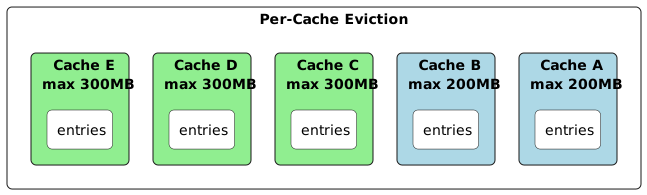
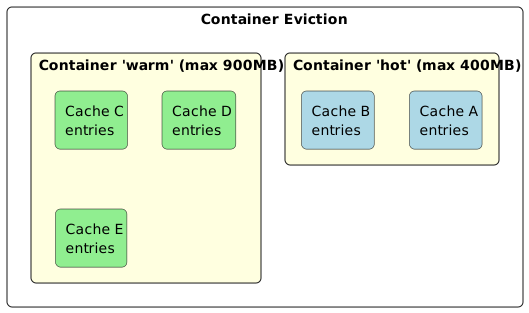
<p>Infinispan 16.1 introduces the concept of bounded memory containers: configure a global container (you can have more
than one), and whether you want it to be bound by count or by memory and reference that container name in the cache
configuration.</p>
</div>
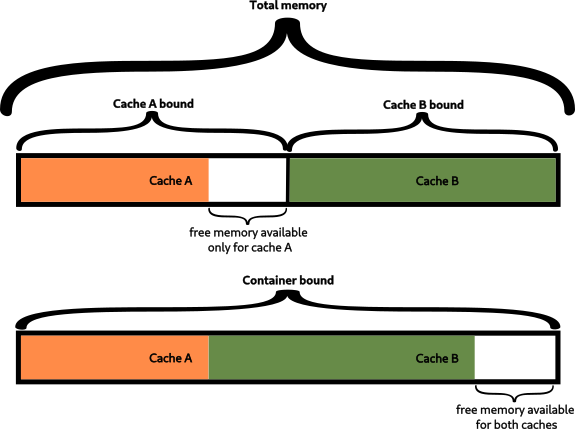
<div class="paragraph">
<p>The following diagram shows the difference between per-cache and container eviction</p>
</div>
<div class="imageblock text-center">
<div class="content">
<img src="/assets/images/blog/memory-container.png" alt="Memory container">
</div>
</div>
<div class="paragraph">
<p>In the example below, the memory configuration for caches <code>a</code> and <code>b</code> combined will be bounded at <code>100MB</code>:</p>
</div>
<div class="listingblock">
<div class="content">
<pre class="highlightjs highlight"><code class="language-xml hljs" data-lang="xml">&lt;infinispan&gt;
   &lt;cache-container&gt;
      &lt;eviction-containers&gt;
         &lt;max-size-container name="max-size" size="100MB"/&gt;
      &lt;/eviction-containers&gt;

      &lt;local-cache name="a"&gt;
          &lt;memory eviction-container="max-size"/&gt;
      &lt;/local-cache&gt;

      &lt;local-cache name="b"&gt;
          &lt;memory eviction-container="max-size"/&gt;
      &lt;/local-cache&gt;
   &lt;/cache-container&gt;
&lt;/infinispan&gt;</code></pre>
</div>
</div>
</div>
</div>
<div class="sect1">
<h2 id="openapi-swagger">OpenAPI / Swagger</h2>
<div class="sectionbody">
<div class="paragraph">
<p>Infinispan 10 introduced the <code>v2</code> REST endpoint which aimed to improve the original API and expand it with all the
requirements we added for data and system management. Unfortunately that API was designed in a way that made it
impossible to represent via an OpenAPI descriptor.</p>
</div>
<div class="paragraph">
<p>Infinispan 16.1 introduces a new <code>v3</code> REST API which <strong>is</strong> OpenAPI-compliant.</p>
</div>
<div class="paragraph">
<p>To try it out, start an Infinispan Server and point to <a href="http://127.0.0.1:11222/swagger-ui/" class="bare">http://127.0.0.1:11222/swagger-ui/</a></p>
</div>
<div class="imageblock text-center">
<div class="content">
<img src="/assets/images/blog/swaggerui.png" alt="Infinispan v3 REST API">
</div>
</div>
</div>
</div>
<div class="sect1">
<h2 id="query-and-lucene-10">Query and Lucene 10</h2>
<div class="sectionbody">
<div class="paragraph">
<p>Thanks to the work done by our friends over at <a href="https://hibernate.org/search/">Hibernate Search</a>, Infinispan now supports
both Lucene 9 and 10.</p>
</div>
</div>
</div>
<div class="sect1">
<h2 id="infinispan-server">Infinispan Server</h2>
<div class="sectionbody">
<div class="sect2">
<h3 id="server-now-requires-java-25">Server now requires Java 25</h3>
<div class="paragraph">
<p>Our server image has already included Java 25 since 16.0, but we&#8217;ve now made this a hard requirement for bare metal
deployments too.
Don&#8217;t worry: the clients can continue running with <em>ye olde</em> legacy Java versions of choice.</p>
</div>
</div>
<div class="sect2">
<h3 id="lucene-10-3">Lucene 10.3</h3>
<div class="paragraph">
<p>By requiring Java 25, the server can now include
<a href="https://lucene.apache.org/core/corenews.html#apache-lucenetm-1030-available">Lucene 10.3</a>, which can leverage SIMD to
increase performance in several areas.</p>
</div>
</div>
<div class="sect2">
<h3 id="pre-start-batch-scripts">Pre-start batch scripts</h3>
<div class="paragraph">
<p>The server can now automatically execute batch scripts before start.
This feature is primarily intended for our operator in order to prepare the server according to its configuration, but
it may also be useful for your own use-cases.</p>
</div>
</div>
<div class="sect2">
<h3 id="aot-cache-in-the-container-image">AOT cache in the container image</h3>
<div class="paragraph">
<p>The server image now includes an <a href="https://openjdk.org/jeps/483">AOT cache</a> to reduce startup and warmup time.</p>
</div>
</div>
</div>
</div>
<div class="sect1">
<h2 id="cli-batch-error-handling">CLI batch error handling</h2>
<div class="sectionbody">
<div class="paragraph">
<p>The CLI has been enhanced to better report errors during batch execution: you can now decide to fail-fast, fail-at-end
or ignore batch errors altogether.</p>
</div>
</div>
</div>
<div class="sect1">
<h2 id="default-mechanisms">Default mechanisms</h2>
<div class="sectionbody">
<div class="paragraph">
<p>Infinispan Server no longer enables weak/vulnerable authentication mechanisms by default: algorithms which use
<code>MD5</code> and <code>SHA-1</code> must be explicitly enabled if you want to keep using them.</p>
</div>
</div>
</div>
<div class="sect1">
<h2 id="backwards-compatibility">Backwards compatibility</h2>
<div class="sectionbody">
<div class="paragraph">
<p>Infinispan 16.1 is fully backwards compatible with 16.0 deployments.</p>
</div>
</div>
</div>
<div class="sect1">
<h2 id="the-next-release">The next release</h2>
<div class="sectionbody">
<div class="paragraph">
<p>According to our <a href="/roadmap/">roadmap</a>, our next release will be 16.2, and it will happen on 2026-06-03.</p>
</div>
</div>
</div>
<div class="sect1">
<h2 id="release-notes">Release notes</h2>
<div class="sectionbody">
<div class="paragraph">
<p>You can look at the <a href="https://github.com/infinispan/infinispan/releases/tag/16.1.0">release notes</a> to see what was changed
since our previous release.</p>
</div>
<div class="paragraph">
<p>Get them from our <a href="https://infinispan.org/download/">download page</a>.</p>
</div>
</div>
</div>]]></content><author><name>Tristan Tarrant</name></author><category term="release" /><category term="final" /><summary type="html"><![CDATA["Polly Want a Pilsner"]]></summary></entry><entry><title type="html">Infinispan Insights: Supporting Redis JSON and Scripting features with Infinispan</title><link href="https://infinispan.org/blog/2026/01/14/infinispan-resp-json-lua-scripting" rel="alternate" type="text/html" title="Infinispan Insights: Supporting Redis JSON and Scripting features with Infinispan" /><published>2026-01-14T00:00:00+00:00</published><updated>2026-01-14T00:00:00+00:00</updated><id>https://infinispan.org/blog/2026/01/14/infinispan-json-commands-lua-scripting</id><content type="html" xml:base="https://infinispan.org/blog/2026/01/14/infinispan-resp-json-lua-scripting"><![CDATA[<div id="preamble">
<div class="sectionbody">
<div class="paragraph">
<p>In Infinispan 15, we added a variety of commands to help replace your Redis server without changing your code. The 15.2 release also included Lua Scripting and Redis JSON APIs.
Key takeaways:</p>
</div>
<div class="ulist">
<ul>
<li>
<p>Understanding Redis JSON commands</p>
</li>
<li>
<p>The benefits of Lua scripting</p>
</li>
<li>
<p>How and why transition applications from Redis to Infinispan, or use Infinispan as a
backend while working with Redis clients.</p>
</li>
</ul>
</div>
<div class="paragraph">
<p>This article follows up on supporting multiple Redis databases with Infinispan.
For more details, check out the <a href="https://infinispan.org/blog/2024/10/07/cache-aliases-redis-databases">full article</a>.</p>
</div>
</div>
</div>
<div class="sect1">
<h2 id="redis-drop-in-replacement-with-infinispan">Redis drop-in replacement with Infinispan</h2>
<div class="sectionbody">
<div class="paragraph">
<p>A drop-in replacement means you can substitute one technology for another without changing
application code. This is valuable because:</p>
</div>
<div class="ulist">
<ul>
<li>
<p><strong>Minimizes migration effort</strong>: You avoid rewriting logic or changing client libraries significantly.</p>
</li>
<li>
<p><strong>Reduces downtime and risk:</strong> You can swap the backend and test incrementally.</p>
</li>
<li>
<p><strong>Retains existing usage patterns</strong>: Developers can continue using the familiar APIs and data models.</p>
</li>
</ul>
</div>
<div class="paragraph">
<p>Replacing open-source Redis with Infinispan offers several key benefits, especially
for Java-based or enterprise-grade systems. Infinispan is fully open source under Apache 2.0,
avoiding the licensing limitations of Redis modules. It provides advanced clustering, built-in high availability
(Active-Active cross site replication), and better support for distributed and geo-replicated setups.
It supports multiple databases even in clustered mode and it offers flexible persistence options like write-through and write-behind.
Additionally, it includes robust security features such as fine-grained access control and encryption,
and supports multiple deployment modes including embedded, server, and Kubernetes-native.</p>
</div>
<div class="paragraph">
<p>Let&#8217;s test how this works, now also with JSON commands and Lua scripts.</p>
</div>
<div class="sect2">
<h3 id="running-infinispan-as-usual">Running Infinispan as usual</h3>
<div class="paragraph">
<p><a href="https://infinispan.org/get-started/">Get started tutorial</a> is the best place to start.
Just run the following command with docker or podman.</p>
</div>
<div class="listingblock">
<div class="content">
<pre class="highlightjs highlight"><code class="language-bash hljs" data-lang="bash">podman/docker run -it -p 11222:11222 -e USER="admin" -e PASS="password" quay.io/infinispan/server:latest</code></pre>
</div>
</div>
<div class="sect3">
<h4 id="running-infinispan-with-the-redis-default-port">Running Infinispan with the Redis default port</h4>
<div class="paragraph">
<p>For those want to keep using the <strong>6379</strong> port, run Infinispan providing the following configuration
file:</p>
</div>
<div class="listingblock">
<div class="content">
<pre class="highlightjs highlight"><code class="language-bash hljs" data-lang="bash">podman/docker run -it -p 6379:6379 -p 11222:11222 -e USER="admin" -e PASS="password" quay.io/infinispan/server:latest -c infinispan-resp.xml</code></pre>
</div>
</div>
<div class="ulist">
<ul>
<li>
<p>Map -p 6379:6379 -p 11222:11222 (you keep the access to the console)</p>
</li>
<li>
<p>Provide -c infinispan-resp.xml configuration file</p>
</li>
<li>
<p>-e USER="admin" -e PASS="password will be used for 11222 port security</p>
</li>
</ul>
</div>
</div>
</div>
<div class="sect2">
<h3 id="using-a-redis-client">Using a Redis client</h3>
<div class="paragraph">
<p>Once the server is running, connect to Infinispan using Redis-CLI.
Use port <strong>11222</strong> instead of the default <strong>6379</strong> if you are running Infinispan as usual.
Since Infinispan is secured by default, make sure to provide the admin credentials.</p>
</div>
<div class="listingblock">
<div class="content">
<pre class="highlightjs highlight"><code class="language-bash hljs" data-lang="bash">&gt; redis-cli -3 -p 11222 --raw
127.0.0.1:11222&gt; AUTH admin password
OK</code></pre>
</div>
</div>
<div class="ulist">
<ul>
<li>
<p>Connect using Protocol 3</p>
</li>
<li>
<p>Use -p 11222 (Infinispan single port)</p>
</li>
<li>
<p>Add --raw option to allow formatting</p>
</li>
<li>
<p>Authenticate with admin/password</p>
</li>
</ul>
</div>
<div class="paragraph">
<p>You can access the Infinispan Server Console as usual in <a href="http://localhost:11222" class="bare">http://localhost:11222</a>, with admin/password credentials.
Check the (<a href="https://infinispan.org/blog/2024/10/07/cache-aliases-redis-databases">cache aliases tutorial</a> to learn
more about respCache and how it connects to Redis Databases and cache aliases.</p>
</div>
<div class="imageblock">
<div class="content">
<a class="image" href="/assets/images/blog/2025-04-11-resp-json-lua/ServerConsole_15_2.png"><img src="/assets/images/blog/2025-04-11-resp-json-lua/ServerConsole_15_2.png" alt="Infinispan Web Console 15.2"></a>
</div>
</div>
</div>
</div>
</div>
<div class="sect1">
<h2 id="redis-json-feature">Redis JSON Feature</h2>
<div class="sectionbody">
<div class="paragraph">
<p>RedisJSON is a powerful extension for managing JSON data directly in Redis.
If you&#8217;re working with JSON-like data and need fast, efficient access and
manipulation, RedisJSON is a great tool to use. This is part of the RedisStack
or Redis Enterprise, and works with the JSON Query engine
(which is not supported by Infinispan for now).</p>
</div>
<div class="listingblock">
<div class="content">
<pre class="highlightjs highlight"><code class="language-bash hljs" data-lang="bash">127.0.0.1:11222&gt; JSON.SET doc $ '{"project":"infinispan", "details": {"latest": "16.0", "year": 2025}}'
OK
127.0.0.1:11222&gt; JSON.GET doc INDENT "\t" NEWLINE "\n" SPACE " " $
[
	{
		"project": "infinispan",
		"details": {
			"latest": "16.0",
			"year": 2025
		}
	}
]
127.0.0.1:11222&gt; JSON.OBJKEYS doc $
project
details</code></pre>
</div>
</div>
<div class="paragraph">
<p>In the console, the REST API currently shows the key, and the value is
only displayed as the JSON.Bucket. Additional support for displaying more data
is planned for future Infinispan releases, so we just need to wait a bit for the ability to
show more content through the REST API.</p>
</div>
<div class="imageblock">
<div class="content">
<a class="image" href="/assets/images/blog/2025-04-11-resp-json-lua/Json_Bucket.png"><img src="/assets/images/blog/2025-04-11-resp-json-lua/Json_Bucket.png" alt="Json RESP cache"></a>
</div>
</div>
<div class="paragraph">
<p><strong>All JSON commands are implemented for the RESP 3 responses.</strong></p>
</div>
</div>
</div>
<div class="sect1">
<h2 id="scripting-feature">Scripting Feature</h2>
<div class="sectionbody">
<div class="paragraph">
<p>Lua scripting in Redis lets you write small programs in the Lua language
that run directly on the Redis server. This helps you perform multiple actions
in one go, saving time and making things faster. You can use it to do complex
tasks without sending many commands back and forth between the client and server.</p>
</div>
<div class="paragraph">
<p>Since <strong>Infinispan 16.0</strong>, you can now use Lua Scripting to perform these operations.</p>
</div>
<div class="listingblock">
<div class="content">
<pre class="highlightjs highlight"><code class="language-bash hljs" data-lang="bash">127.0.0.1:11222&gt; EVAL "return 'Hello, scripting!'" 0
Hello, scripting!
127.0.0.1:11222&gt; EVAL "return ARGV[1]" 0 Hello
Hello
127.0.0.1:11222&gt; EVAL "return ARGV[1]" 0 Parameterization!
Parameterization!
127.0.0.1:11222&gt; EVAL "redis.call('SET', KEYS[1], ARGV[1]) redis.call('SET', KEYS[2], ARGV[2]) redis.call('SET', KEYS[3], ARGV[3]) return 'SET commands executed'" 3 key1 key2 key3 value1 value2 value3
SET commands executed
127.0.0.1:11222&gt; KEYS "*"
key2
key3
key1
doc</code></pre>
</div>
</div>
<div class="paragraph">
<p>Technically speaking, when using Infinispan, scripts are stored in an internal
cache <strong>___script_cache</strong>.
This cache is handled by Infinispan and manipulating it requires admin permissions.</p>
</div>
</div>
</div>
<div class="sect1">
<h2 id="conclusions">Conclusions</h2>
<div class="sectionbody">
<div class="paragraph">
<p>In this tutorial, you’ve learned how to use Infinispan for JSON commands and Scripting from
version 16.0. Redis Hot Replacement is gaining attention,
especially with the concerns about Redis' licensing changes in 2024.
Infinispan, an open-source solution under the Apache 2.0 license,
is part of the <a href="https://www.commonhaus.org/">Commonhaus foundation</a>, allowing
free use in your products.
If you need official support, you can get it through supported versions of Infinispan.</p>
</div>
</div>
</div>]]></content><author><name>Katia Aresti</name></author><category term="resp" /><category term="infinispan" /><category term="json" /><category term="lua" /><summary type="html"><![CDATA[In Infinispan 15, we added a variety of commands to help replace your Redis server without changing your code. The 15.2 release also included Lua Scripting and Redis JSON APIs. Key takeaways:]]></summary></entry><entry><title type="html">Infinispan 16.0.5</title><link href="https://infinispan.org/blog/2025/12/18/infinispan-16-0-5" rel="alternate" type="text/html" title="Infinispan 16.0.5" /><published>2025-12-18T00:00:00+00:00</published><updated>2025-12-18T00:00:00+00:00</updated><id>https://infinispan.org/blog/2025/12/18/infinispan-16.0.5</id><content type="html" xml:base="https://infinispan.org/blog/2025/12/18/infinispan-16-0-5"><![CDATA[<div id="preamble">
<div class="sectionbody">
<div class="paragraph">
<p>We don&#8217;t usually blog about micros&#8230;&#8203; but this is the second time in as many days that I have to break with tradition.</p>
</div>
</div>
</div>
<div class="sect1">
<h2 id="serious-protostream-bug-with-latin1-strings">Serious ProtoStream bug with Latin1 strings</h2>
<div class="sectionbody">
<div class="paragraph">
<p>If you were using strings that could be represented as Latin1/ISO-8859-1 in your protocol buffer payloads, ProtoStream
was corrupting them. ASCII and full UTF-8 were fine. We&#8217;ve now fixed this bug. Thanks
<a href="https://github.com/sf-db">Sergey Filipkov</a> for reporting this.</p>
</div>
</div>
</div>
<div class="sect1">
<h2 id="java-serialization-failure-to-serialize-some-collections">Java serialization failure to serialize some collections</h2>
<div class="sectionbody">
<div class="paragraph">
<p>Another marshalling bug was affecting Java serialization of some collection types. Thanks <a href="https://github.com/ratoaq2">Rato</a>
for reporting this</p>
</div>
</div>
</div>
<div class="sect1">
<h2 id="release-notes">Release notes</h2>
<div class="sectionbody">
<div class="paragraph">
<p>You can look at the <a href="https://github.com/infinispan/infinispan/releases/tag/16.0.5">release notes</a> to see what was changed
since our previous release.</p>
</div>
<div class="paragraph">
<p>Get them from our <a href="https://infinispan.org/download/">download page</a>.</p>
</div>
</div>
</div>]]></content><author><name>Tristan Tarrant</name></author><category term="release" /><category term="final" /><summary type="html"><![CDATA[We don&#8217;t usually blog about micros&#8230;&#8203; but this is the second time in as many days that I have to break with tradition.]]></summary></entry><entry><title type="html">Infinispan 16.0.4</title><link href="https://infinispan.org/blog/2025/12/17/infinispan-16-0-4" rel="alternate" type="text/html" title="Infinispan 16.0.4" /><published>2025-12-17T00:00:00+00:00</published><updated>2025-12-17T00:00:00+00:00</updated><id>https://infinispan.org/blog/2025/12/17/infinispan-16.0.4</id><content type="html" xml:base="https://infinispan.org/blog/2025/12/17/infinispan-16-0-4"><![CDATA[<div id="preamble">
<div class="sectionbody">
<div class="paragraph">
<p>We don&#8217;t usually blog about micros, unless there are important things to mention, and in this case we have a couple
of significant changes to share with you.</p>
</div>
</div>
</div>
<div class="sect1">
<h2 id="spring-framework-7-and-spring-boot-4-support">Spring Framework 7 and Spring Boot 4 support</h2>
<div class="sectionbody">
<div class="paragraph">
<p>Spring Framework 7 and Spring Boot 4 were released just after we tagged 16.0.0. We were planning on releasing support
for these with the 16.1 release at the beginning of February, but we decided it was too important to wait until
then.
16.0.4 includes artifacts for both Spring 7 / Boot 4 and Spring 6 / Boot 3. See the
<a href="https://infinispan.org/docs/stable/titles/spring/spring.html">documentation</a> for details</p>
</div>
</div>
</div>
<div class="sect1">
<h2 id="metrics-changes">Metrics changes</h2>
<div class="sectionbody">
<div class="paragraph">
<p>We forgot to make some changes to the default metrics configuration attributes during the 16.0 development cycle, even
though that was our intention all along.</p>
</div>
<div class="ulist">
<ul>
<li>
<p>JVM metrics are no longer registered by default in embedded mode, as that should be the job of the application and
not the library.</p>
</li>
<li>
<p>Cache names are now included in metrics as tags as opposed to names, which should make querying and charting easier</p>
</li>
<li>
<p>Legacy metrics name prefixes (base and vendor) have been replaced with more appropriate library names.</p>
</li>
</ul>
</div>
<div class="paragraph">
<p>All these can be reverted to their old configuration if needed, but trust us: the new defaults are better.</p>
</div>
</div>
</div>
<div class="sect1">
<h2 id="release-notes">Release notes</h2>
<div class="sectionbody">
<div class="paragraph">
<p>You can look at the <a href="https://github.com/infinispan/infinispan/releases/tag/16.0.4">release notes</a> to see what was changed
since our previous release.</p>
</div>
<div class="paragraph">
<p>Get them from our <a href="https://infinispan.org/download/">download page</a>.</p>
</div>
</div>
</div>]]></content><author><name>Tristan Tarrant</name></author><category term="release" /><category term="final" /><summary type="html"><![CDATA[We don&#8217;t usually blog about micros, unless there are important things to mention, and in this case we have a couple of significant changes to share with you.]]></summary></entry><entry><title type="html">Infinispan 16.0 is out!</title><link href="https://infinispan.org/blog/2025/11/10/infinispan-16-0" rel="alternate" type="text/html" title="Infinispan 16.0 is out!" /><published>2025-11-10T00:00:00+00:00</published><updated>2025-11-10T00:00:00+00:00</updated><id>https://infinispan.org/blog/2025/11/10/infinispan-16.0</id><content type="html" xml:base="https://infinispan.org/blog/2025/11/10/infinispan-16-0"><![CDATA[<div id="preamble">
<div class="sectionbody">
<div class="paragraph">
<p><strong><em>"Keep Rollin'"</em></strong></p>
</div>
<div class="paragraph">
<p>Infinispan 16.0 is here, and it is codenamed <a href="https://untappd.com/b/lake-of-bays-brewing-company-keep-rollin/5822804">"Keep Rollin'"</a>.</p>
</div>
<div class="paragraph">
<p>This is a very significant release, as it introduces zero-downtime in-place rolling upgrades: the capability of
incrementally upgrading individual nodes in a cluster without having to stop operations.</p>
</div>
<div class="imageblock text-center">
<div class="content">
<img src="/assets/images/blog/keeprollin.jpeg" alt="Keep Rollin'" width="375" height="500">
</div>
</div>
</div>
</div>
<div class="sect1">
<h2 id="final-not-final">Final not .Final</h2>
<div class="sectionbody">
<div class="paragraph">
<p>Starting with this release, we will no longer be appending <code>.Final</code> to the version number. This release is therefore just <code>16.0.1</code>.
Why not <code>16.0.0</code> ? Don&#8217;t ask 😀.</p>
</div>
</div>
</div>
<div class="sect1">
<h2 id="in-place-rolling-upgrades">In-place rolling upgrades</h2>
<div class="sectionbody">
<div class="paragraph">
<p>Starting with Infinispan 16.0, we guarantee that it will be possible to upgrade the nodes of a live Infinispan cluster
to a newer version with zero downtime.
This guarantee will initially cover point releases (16.0.x &#8594; 16.0.y), but we will strive to also maintain it across
minor releases (16.x &#8594; 16.y): for every new release, we will be providing a table of supported upgrade paths to help
you plan your upgrade strategies.</p>
</div>
<div class="sect2">
<h3 id="clustering">Clustering</h3>
<div class="paragraph">
<p>The clustering messages, that Infinispan nodes use to communicate with each other, have been rewritten to use
<a href="https://protobuf.dev/">Protocol Buffers</a>, via the <a href="https://github.com/infinispan/protostream">ProtoStream</a> serialization
library. By adopting ProtoBuf&#8217;s <a href="https://protobuf.dev/best-practices/dos-donts/">best practices</a> for schema evolution and
a number of supporting tools, we can guarantee that incompatibilities cannot be introduced into these messages without
breaking our builds and tests.</p>
</div>
</div>
</div>
</div>
<div class="sect1">
<h2 id="upgrade-test-harness">Upgrade test harness</h2>
<div class="sectionbody">
<div class="paragraph">
<p>We have implemented an extensive test harness, integrated into our CI pipelines, that validates that every change that is
made to Infinispan does not break backwards compatibility. This harness exercises every command,
supported by coverage reports that help us identify untested code paths.</p>
</div>
</div>
</div>
<div class="sect1">
<h2 id="console">Console</h2>
<div class="sectionbody">
<div class="paragraph">
<p>Since Infinispan 15.2, the console has used <a href="https://www.patternfly.org/">PatternFly</a> 6 for its interface.
With this major update, we also added new features for users starting from version 16.0.</p>
</div>
<div class="sect2">
<h3 id="update-at-runtime-cache-configuration">Update at runtime cache configuration</h3>
<div class="paragraph">
<p>We have allowed mutating some cache configuration attributes at runtime for a while, and, starting with this release,
this can also be done from the Web Console.</p>
</div>
<div class="paragraph">
<p>A new menu option is now available for administrators:</p>
</div>
<div class="imageblock text-center">
<div class="content">
<img src="/assets/images/blog/2025-infinispan-16-release/consoleUpdateCacheConfigRuntime1.png" alt="Edit Runtime Configuration Menu">
</div>
</div>
<div class="paragraph">
<p>The runtime properties that can be updated will be listed:</p>
</div>
<div class="imageblock text-center">
<div class="content">
<img src="/assets/images/blog/2025-infinispan-16-release/consoleUpdateCacheConfigRuntime2.png" alt="Edit Runtime Configuration Screen">
</div>
</div>
</div>
<div class="sect2">
<h3 id="rolling-upgrade-detection">Rolling Upgrade detection</h3>
<div class="paragraph">
<p>From version 16.0 onward, when a rolling upgrade is in progress, the Console
will display a warning to inform users that the operation is underway.</p>
</div>
<div class="imageblock text-center">
<div class="content">
<img src="/assets/images/blog/2025-infinispan-16-release/consoleRollingUpgrade.png" alt="Rolling Upgrade Detection">
</div>
</div>
</div>
<div class="sect2">
<h3 id="working-behind-a-reverse-proxy">Working behind a Reverse Proxy</h3>
<div class="paragraph">
<p>Previously, the console URL could not be configured to work behind a reverse proxy.
Starting with version 16.0, you can set up Infinispan and the console to run behind one, such as NGINX.
The <code>X-Forwarded-Prefix</code> header is now supported by both Infinispan and the console to correctly serve the
console and the REST API.</p>
</div>
<div class="exampleblock">
<div class="content">
<div class="literalblock">
<div class="content">
<pre> location /infinispan/console/ {
            proxy_pass http://infinispan:11222/console/;
            proxy_set_header X-Forwarded-Prefix /infinispan;
}</pre>
</div>
</div>
</div>
</div>
<div class="paragraph">
<p>See the <a href="https://github.com/infinispan/infinispan-simple-tutorials/tree/main/infinispan-remote/reverse-proxy-infinispan">Reverse Proxy Simple Tutorial</a>
in the Infinispan Simple Tutorials repository for more details.</p>
</div>
</div>
</div>
</div>
<div class="sect1">
<h2 id="schemas-management-client-api">Schemas Management Client API</h2>
<div class="sectionbody">
<div class="paragraph">
<p>Users can now manage ProtoStream Schemas with a dedicated administration API.</p>
</div>
<div class="exampleblock">
<div class="content">
<div class="paragraph">
<p>RemoteSchemasAdmin admin = remoteCacheManager.administration().schemas();
Optional&lt;Schema&gt; = admin.get("schemaName");</p>
</div>
</div>
</div>
<div class="paragraph">
<p>See the <a href="https://github.com/infinispan/infinispan-simple-tutorials/tree/main/infinispan-remote/schemas">Schemas Simple Tutorial</a>
in the Infinispan Simple Tutorials repository for more details.</p>
</div>
</div>
</div>
<div class="sect1">
<h2 id="query">Query</h2>
<div class="sectionbody">
<div class="sect2">
<h3 id="refactoring">Refactoring</h3>
<div class="paragraph">
<p>The various query modules have all been aggregated into the single <code>infinispan-query</code> JAR, greatly simplifying our
dependency tree and paving the way for JPMS encapsulation.</p>
</div>
</div>
<div class="sect2">
<h3 id="aggregations">Aggregations</h3>
<div class="paragraph">
<p>Previously, only the <strong>count</strong> aggregation query could be executed in an indexed clustered query, providing excellent performance.
Now, all other aggregation types (such as <strong>sum</strong>, <strong>avg</strong>, and others) work in the same way.
This improvement comes from the new capabilities in Hibernate Search 8.1, which has been
integrated into Infinispan’s internal engine.</p>
</div>
</div>
</div>
</div>
<div class="sect1">
<h2 id="server">Server</h2>
<div class="sectionbody">
<div class="paragraph">
<p>We have introduced several fixes and enhancements to the Infinispan Server.</p>
</div>
<div class="sect2">
<h3 id="server-container-image">Server container image</h3>
<div class="paragraph">
<p>The Infinispan Server container image is now built using the bare minimum required components, aiming to provide a
significantly reduced attack surface.</p>
</div>
</div>
<div class="sect2">
<h3 id="server-startup">Server startup</h3>
<div class="paragraph">
<p>We have decoupled the server and the cache container start procedure, where they can start concurrently.
This provides a faster startup time for the server, that can start replying to requests earlier.
This helps in scenarios where the server receive probe requests for liveness and readiness. Also, this allows
for better handling when a cache may fail to start allowing other caches to continue operating.</p>
</div>
</div>
<div class="sect2">
<h3 id="on-demand-caches">On-demand caches</h3>
<div class="paragraph">
<p>The caches associated with dedicated connectors, such as Memcached and RESP, do not create the caches at start.
These caches are now created on demand at the first access.
In case these endpoints are not accessed, the caches are never created.</p>
</div>
</div>
<div class="sect2">
<h3 id="updated-lua-engine">Updated Lua engine</h3>
<div class="paragraph">
<p>We are shipping an updated Lua 5.1 engine, for Redis scripting, that includes a number of CVE fixes that have not been
applied to the upstream Lua repository. Also, a number of dangerous Lua scripting operations have been disabled.
The security of your servers is of the highest priority to us.</p>
</div>
</div>
</div>
</div>
<div class="sect1">
<h2 id="jdk-improvements">JDK improvements</h2>
<div class="sectionbody">
<div class="paragraph">
<p>While Infinispan still requires at least JDK 17, we have made several changes to take advantage of the features
introduced in newer JDKs, including support for the recently released JDK 25.</p>
</div>
<div class="sect2">
<h3 id="virtual-threads">Virtual threads</h3>
<div class="paragraph">
<p>Infinispan by default not utilized Virtual Threads in both Embedded and Server modes. This includes Infinispan
enabling virtual threads in JGroups by default. Virtual threads are used by the non-blocking and blocking thread
pools in Embedded mode and the blocking thread pool in Server mode. The latter utilizes Netty event loop for its
non-blocking thread pool which does not yet support virtual threads.</p>
</div>
<div class="paragraph">
<p>If necessary is possible to disable by setting the <code>org.infinispan.threads.virtual</code> system property to <code>false</code>.</p>
</div>
</div>
<div class="sect2">
<h3 id="aot">AOT</h3>
<div class="paragraph">
<p>Infinispan Server (and the CLI) can leverage OpenJDK&#8217;s Ahead-of-Time features introduced in
<a href="https://openjdk.org/jeps/483">JEP 483</a> to decrease startup time and initial memory usage.</p>
</div>
</div>
</div>
</div>
<div class="sect1">
<h2 id="fixes">Fixes</h2>
<div class="sectionbody">
<div class="paragraph">
<p>Lots of these. However, should you find something that doesn&#8217;t work, head over to our
<a href="https://github.com/infinispan/infinispan/issues">issues</a> and provide any details that help us debug and solve problems.</p>
</div>
</div>
</div>
<div class="sect1">
<h2 id="deprecations-and-removals">Deprecations and removals</h2>
<div class="sectionbody">
<div class="paragraph">
<p>The old Single File Store has now been completely replaced by the more scalable Soft-Index File Store and cannot be
configured declaratively any longer.</p>
</div>
</div>
</div>
<div class="sect1">
<h2 id="documentation">Documentation</h2>
<div class="sectionbody">
<div class="paragraph">
<p>As usual, many improvements, updates and fixes.</p>
</div>
</div>
</div>
<div class="sect1">
<h2 id="whats-next">What&#8217;s next?</h2>
<div class="sectionbody">
<div class="paragraph">
<p>Infinispan is adopting timeboxed releases starting with our next release (16.1). See our <a href="https://infinispan.org/roadmap/">roadmap</a>
for information. We will soon be blogging more about it.</p>
</div>
</div>
</div>
<div class="sect1">
<h2 id="release-notes">Release notes</h2>
<div class="sectionbody">
<div class="paragraph">
<p>You can look at the <a href="https://github.com/infinispan/infinispan/releases/tag/16.0.0">release notes</a> to see what was changed
since our last development build.</p>
</div>
<div class="paragraph">
<p>Get them from our <a href="https://infinispan.org/download/">download page</a>.</p>
</div>
</div>
</div>]]></content><author><name>Tristan Tarrant</name></author><category term="release" /><category term="final" /><summary type="html"><![CDATA["Keep Rollin'"]]></summary></entry></feed>