Update by Query in Ickle: Bulk Updates Without Reading Data Back

One of the features I am most excited about in Infinispan 16.3 is update by query in Ickle. If you have ever needed to update thousands of entries in a cache based on a condition, you know the pain: read them, modify them in your application, write them back one by one. With update by query, you can now do this in a single statement, directly on the server.
In this post I will walk you through the syntax, show real-world examples, and explain where this feature shines and where it has limitations.
The syntax
The general form of an update query in Ickle is:
UPDATE FROM <entityName>
  SET <field> = <value> [, SET <field> = <value>]*
  [, ADD <field> = (<value>, ...)]
  [, REMOVE <field> = [<value>, ...]]
  [WHERE <condition>]
There are three operations:
-
SET - assigns a new value to a field. When the target is a collection, use a bracketed list
['a', 'b']to replace the entire existing collection. -
ADD - adds values to a collection field without replacing its contents. Use a parenthesized list
('a', 'b')to add multiple values at once. -
REMOVE - removes values from a collection field without affecting other members. Use a bracketed list
['a', 'b']to remove multiple values at once.
You can combine SET, ADD and REMOVE operations in a single statement, and you can use any Ickle WHERE clause
to filter which entries are affected.
Supported value types include strings, numbers, booleans, null, and named parameters (:paramName). Keywords are case-insensitive, so UPDATE, update and Update all work.
A practical example: product catalog
Let me use an example that is closer to what you might find in a real application. Imagine you are running an e-commerce platform and you have a product catalog stored in Infinispan.
@Proto
@Indexed
public record Product(
   @Keyword(projectable = true, sortable = true)
   String sku,

   @Text
   String name,

   @Keyword(projectable = true, normalizer = "lowercase")
   String category,

   @Basic(projectable = true, sortable = true)
   Double price,

   @Basic(projectable = true)
   Boolean active,

   @Keyword(projectable = true)
   List<String> tags,

   @Keyword(projectable = true, normalizer = "lowercase")
   String warehouse
) {
}
Scenario 1: Price adjustment for a category
Black Friday is coming and you want to apply a discount to all products in the "electronics" category. Before update by query, you would have had to read all electronics products, modify the price in Java, and put them back. Now:
UPDATE FROM catalog.Product SET price = 79.99 WHERE category = 'electronics' AND price = 99.99This runs entirely on the server. No data is transferred to your application and back.
Scenario 2: Deactivating out-of-stock products
Your warehouse system tells you that a specific warehouse is temporarily out of stock. You want to deactivate all products from that warehouse:
UPDATE FROM catalog.Product SET active = false WHERE warehouse = 'warehouse-east'When stock is back, just run the reverse:
UPDATE FROM catalog.Product SET active = true WHERE warehouse = 'warehouse-east'Scenario 3: Tagging products for a promotion
You want to tag all active products under 50 euros with a "budget-friendly" tag, without removing their existing tags:
UPDATE FROM catalog.Product ADD tags = ('budget-friendly') WHERE price < 50.0 AND active = trueNotice the use of ADD instead of SET. This appends to the existing tags collection instead of replacing it. This is very useful when you have multi-value fields like tags, labels, or categories.
Scenario 4: Removing a discontinued tag
A promotion is over and you want to clean up the "summer-sale" tag from all products:
UPDATE FROM catalog.Product REMOVE tags = ['summer-sale']No WHERE clause here - this removes the tag from every product that has it.
Scenario 5: Combining operations
You can combine multiple operations in a single query. For example, deactivating products and tagging them at the same time:
UPDATE FROM catalog.Product SET active = false, ADD tags = ('discontinued') WHERE category = 'legacy'Using it from Java
In your Java application, update by query works just like any other Ickle query:
RemoteCache<String, Product> cache = cacheManager.getCache("products");

int updated = cache.query("UPDATE FROM catalog.Product SET active = false WHERE warehouse = 'warehouse-east'")
   .executeStatement();

System.out.println("Updated " + updated + " products");
The executeStatement() method returns the number of entries that were modified.
There is also an async variant, executeStatementAsync(), that returns a CompletionStage<Integer>.
You can also use named parameters to avoid hardcoding values in the query string:
int updated = cache.query("UPDATE FROM catalog.Product SET active = :status WHERE warehouse = :wh")
   .setParameter("status", false)
   .setParameter("wh", "warehouse-east")
   .executeStatement();
Using it from the Console
The Infinispan Web Console also supports update by query. In the cache Query tab,
you will find an "Update entries" action that lets you execute an Ickle UPDATE statement
directly from the browser. The console shows a confirmation dialog before executing
and reports the number of affected entries.
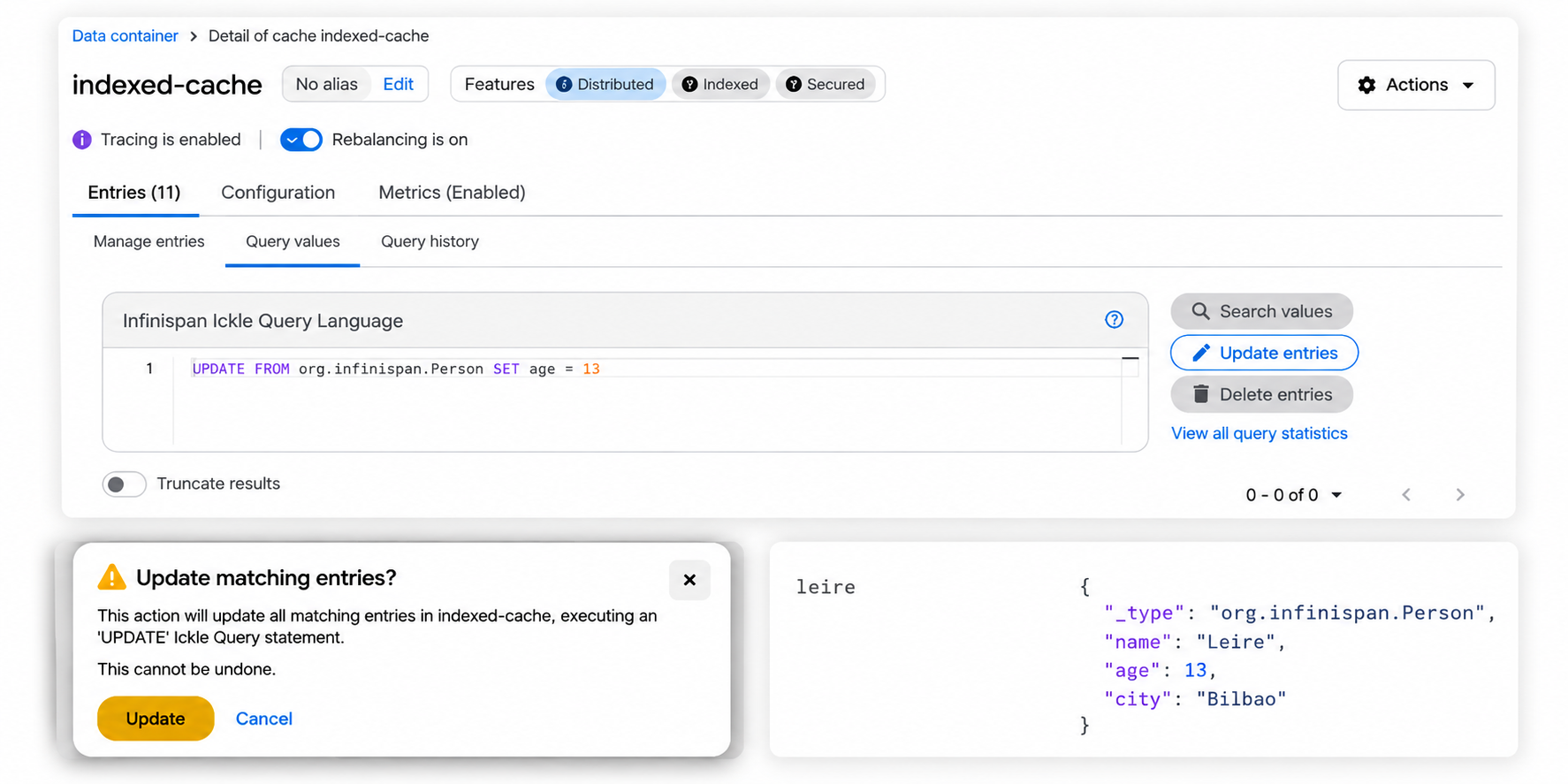
This is very handy for operational tasks where you need to make a quick fix without writing code or deploying anything.
Use cases
Here are some real-world scenarios where update by query can save you a lot of effort:
-
Feature flags and toggles - enable or disable features for a subset of users or tenants
-
Bulk status changes - deactivate accounts, mark orders as shipped, close expired sessions
-
Tagging and labeling - add or remove labels, categories, or tags across many entries
-
Data migration - set default values for a new field across existing entries
-
Operational fixes - correct a wrong value across multiple entries without a full redeploy
Limitations to keep in mind
This is the first version of update by query, and there are some things to be aware of:
-
Values can only be constants - you cannot reference other fields or use expressions like
SET price = price * 0.8. This means percentage-based discounts or computed values are not yet possible. Named parameters (:paramName) are supported though, so you can pass values from your application. Expression and function support is planned for future versions. -
No projections, ORDER BY, or GROUP BY - UPDATE statements are pure data modifications. If you need to know which entries will be affected, run a SELECT first with the same WHERE clause.
-
No paging - you cannot use
firstResultormaxResultsto limit which entries are updated. The update always applies to all matching entries. -
No indexed path access - you can use dot-path traversal like
address.city, but array index access liketags[0]is not supported in the update path. -
Not atomic across entries - each entry is updated individually using
cache.compute(), so each single entry update is atomic. However, the overall operation is not transactional. If the operation is interrupted, some entries may have been updated and others not. Plan accordingly for critical operations. -
No cross-cache updates - each update targets a single cache.
What is coming next
As I mentioned, future versions of Infinispan 16 will bring expression support to update queries. This will allow operations like:
-- Not yet available, coming in 16.4
UPDATE FROM catalog.Product SET price = price * 0.8 WHERE category = 'electronics'
This will make update by query even more powerful for real-world use cases.
Try it out
Update by query is available in Infinispan 16.3. You can get started with:
docker run -it -p 11222:11222 -e USER="admin" -e PASS="password" quay.io/infinispan/server:latestFor more details on Ickle query syntax, check the Query documentation. And if you want to see the full list of changes in 16.3, take a look at the Infinispan 16.3 release blog post.
If you have feedback or questions, join us on Zulip or GitHub Discussions.
Happy querying!
Get it, Use it, Ask us!
We’re hard at work on new features, improvements and fixes, so watch this space for more announcements!Please, download and test the latest release.
The source code is hosted on GitHub. If you need to report a bug or request a new feature, look for a similar one on our GitHub issues tracker. If you don’t find any, create a new issue.
If you have questions, are experiencing a bug or want advice on using Infinispan, you can use GitHub discussions. We will do our best to answer you as soon as we can.
The Infinispan community uses Zulip for real-time communications. Join us using either a web-browser or a dedicated application on the Infinispan chat.
Katia Aresti
Katia Aresti is part of the core Infinispan team, and she is responsible for the integration with other frameworks such as Spring-Boot, Vert.x and Quarkus, developing new features such as Clustered Counters, REST API endpoints and the Server Console.